
Managing the agency suppression list
Add and remove numbers that automatic phone screening skips across every account in your agency with Shield in its plan.
4 min read
Before you start
- DialClear installed in your CRM
- Shield or Compliance Suite as your CRM plan
- Edit access to DialClear in this account
Tip
The suppression list only stops screening. Use it for numbers you never need screened, and keep your Do Not Call list separately.
The agency suppression list is a list of phone numbers DialClear skips when it screens contacts on its own. It is shared by every account in your agency whose CRM plan includes Shield, so you add a number once and it applies everywhere.
What the list does
When a contact's number is on the list, phone screening that starts on its own does not run for it. That covers contacts being created or updated, tag requests in your CRM, and 30 day Protection rechecks. No lookup is charged, and no fields or Do Not Disturb marks are written to that contact.
A few things still run as normal.
- A lookup you run yourself on Lookups is screened and billed.
- A lookup sent through the API is screened and billed.
- Address and location lookups and contact verification are not affected. The list only covers phone screening.
Warning
A suppressed number is never checked against Do Not Call or litigator lists by automatic screening. If that number later lands on a list, DialClear will not tell you. Only add numbers you are sure you do not need screened, like your own office lines or test numbers.
Add numbers
Open Shield from the left menu and scroll to Agency suppression list.
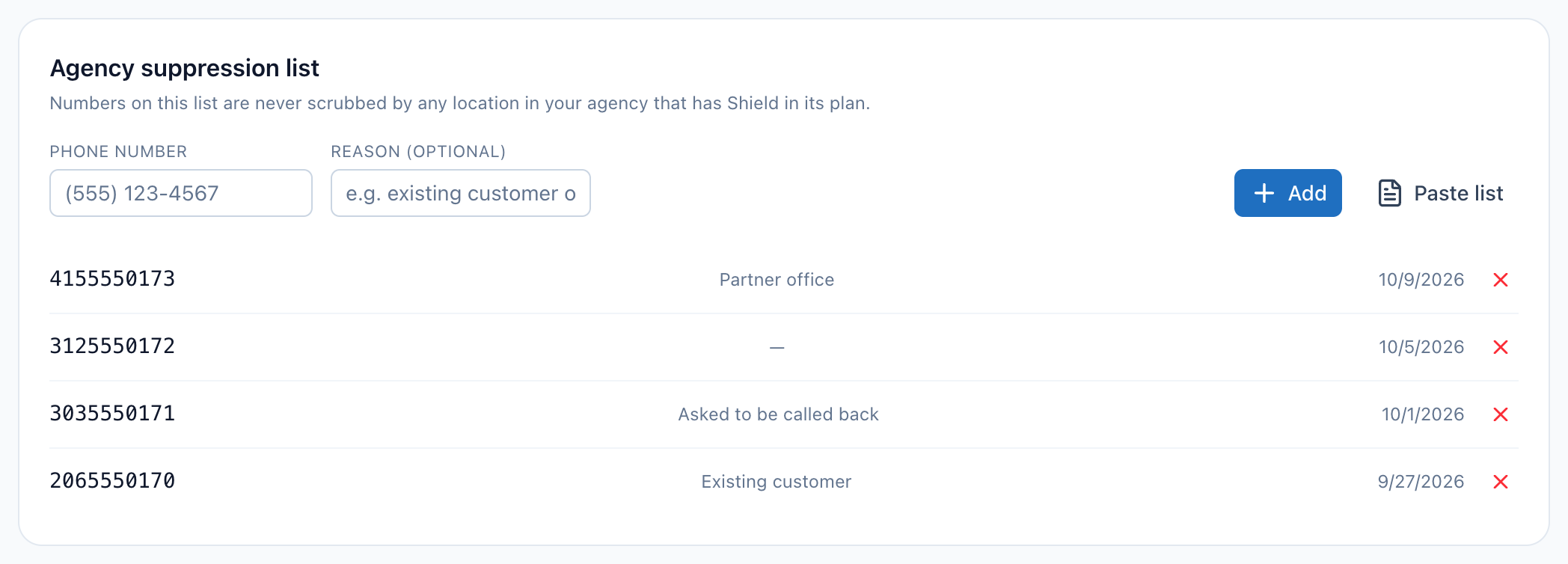
- Type one phone number here. Any common format works, such as (555) 123 4567 or 5551234567.
- Reason is optional. It is saved next to the number so your team knows why it was added.
- Add saves the typed number and any pasted numbers together.
- Paste list opens a larger box for adding many numbers at once.
- Each row shows the number, its reason and the date it was added. The x at the end of a row removes that number.
Step 1. Enter the number
Type the number into Phone number. Add a short note under Reason (optional) if it helps.
Step 2. Paste a longer list if you have one
Choose Paste list and paste your numbers, one per line or separated by commas. You can add up to 1,000 numbers at a time. The same reason is saved for every number in that batch.
Step 3. Choose Add
Choose Add. A message confirms how many numbers were sent, and they appear in the list below the form. A number that is already on the list is not added twice, though the message still counts it. Anything that is not a valid phone number is skipped.
Remove a number
Each row shows the number, its reason, and the date it was added. Choose the x at the end of a row to remove that number. It is removed right away, with no confirmation, and automatic screening covers it again from the next time the contact is created or updated.
Who can use the list
The list only takes effect for CRM accounts whose plan includes Shield, which means the Shield plan or Compliance Suite. Solo Shield on a direct account does not include it.
To see and change the list you need edit access to DialClear in your account. A person who manages your account can turn that on for you under Team access on Settings.
Troubleshooting
I do not see the Agency suppression list card
Your login may have view only access. Ask a person who manages your account to give you access under Team access. If the card says the list is available once the account is linked to an agency, DialClear could not find the agency this account belongs to, so there is no shared list to show yet.
A number on the list was still screened
Check how that lookup started. Lookups you run yourself and API lookups always run. Also check your plan. If this account's plan does not include Shield, the list has no effect on it.
I see "No valid phone number"
DialClear accepts United States phone numbers with ten digits, with or without a leading 1. None of the numbers you sent matched that. Check for a missing digit or extra text in the box.
Is the suppression list a Do Not Call list?
No. It only tells DialClear what not to screen. It does not stop anyone from calling the number. Keep your own internal Do Not Call list in your CRM.