
Which features are in my plan
What each CRM plan and each direct subscription includes, what a page looks like before your plan has it, and how to change your plan.
5 min read
Tip
Compliance Suite gives a CRM account Shield, the Consent Vault and Compliance in one plan.
Shield, Consent Vault and Compliance come with paid plans. Screening is on every plan and is paid per lookup. How you add the paid features depends on how you use DialClear.
- If you installed DialClear from the App Marketplace, the plan you picked at install decides what your sub account gets. Plans change in the App Marketplace.
- If you signed up at dialclear.co, you have no plan. You add subscriptions yourself on the Billing page.
The CRM plans
| Plan | Price | What you get |
|---|---|---|
| Clear | Free | Screening, paid per lookup. No monthly fee. |
| Shield | $19/mo | Everything in Clear, plus Shield and the agency suppression list. |
| DNC Audit Pack | $29/mo | Everything in Clear, plus a written Do Not Call policy, monthly compliance reports and the Consent Vault. |
| Compliance Suite | $48/mo | Everything in Clear, Shield and the DNC Audit Pack together. |
Lookups bill your CRM wallet at the same per lookup price on every plan.
Subscriptions on a direct account
| Subscription | Price | What you get |
|---|---|---|
| Solo Shield | $19/mo | Shield, without the agency suppression list |
| DNC Audit Pack | $29/mo | A written Do Not Call policy, monthly compliance reports and the Consent Vault |
Lookups on a direct account spend prepaid tokens, see Buy tokens for your lookups.
Important
Shield applies flags to contacts in a connected CRM account. A direct account with no CRM account connected has no contacts for Shield to flag, so Solo Shield does nothing for it.
Note
The Consent Vault shows that a consent record has not been changed since it was saved. It does not decide whether the consent itself was valid.
A CRM plan and a direct subscription are separate. Inside your CRM only the plan counts, so a subscription bought at dialclear.co does not add anything there. See Using DialClear in your CRM or in the portal.
What you see before your plan includes a feature
Inside your CRM
Your plan decides which pages exist. On Clear the menu shows Overview, Lookups, Protection, Settings, Help and Billing. Shield adds Shield. The DNC Audit Pack adds Consent Vault and Compliance. Compliance Suite adds all three.
A page your plan does not include is left out of the menu, so you never see a locked card there. If you open one from a saved link, a short line says the feature is not included in this account's plan.
In the portal
The Compliance pages always show in the menu. Until you subscribe, each one shows a card that explains what it does.
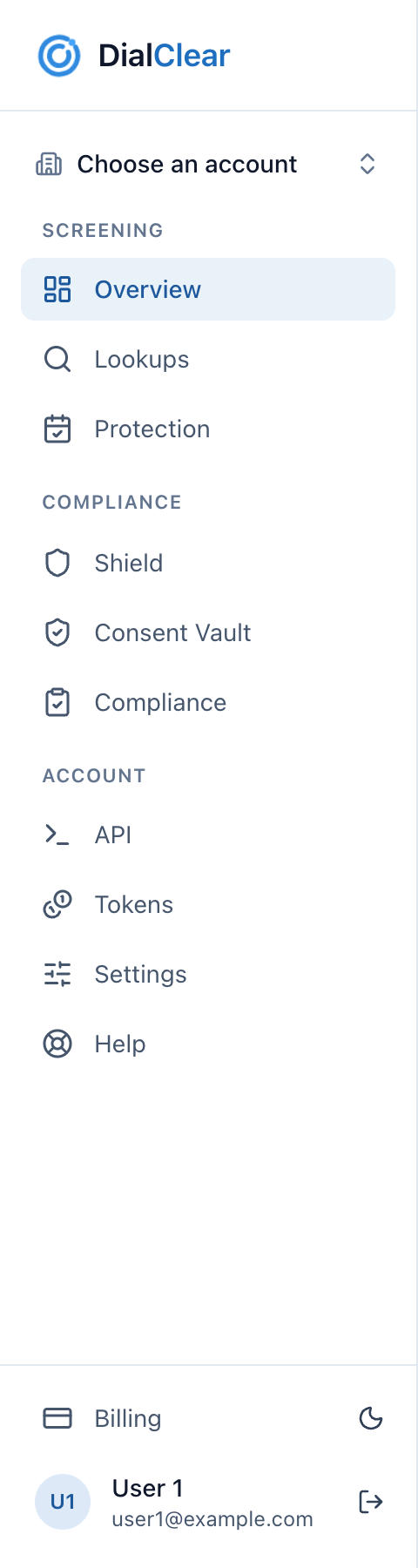
- The Screening pages are on every plan, including the free Clear plan.
- The Compliance group. In the portal it always shows. Inside your CRM each page only shows when the plan includes it.
- Billing is where a direct account subscribes, and where a CRM account sees its plan name.

- This card means Shield is not active on your account yet. Subscribing to Solo Shield turns it on.
- View plans takes you to the Billing page, where Solo Shield is listed.
The Consent Vault and Compliance pages show a similar card for the DNC Audit Pack.
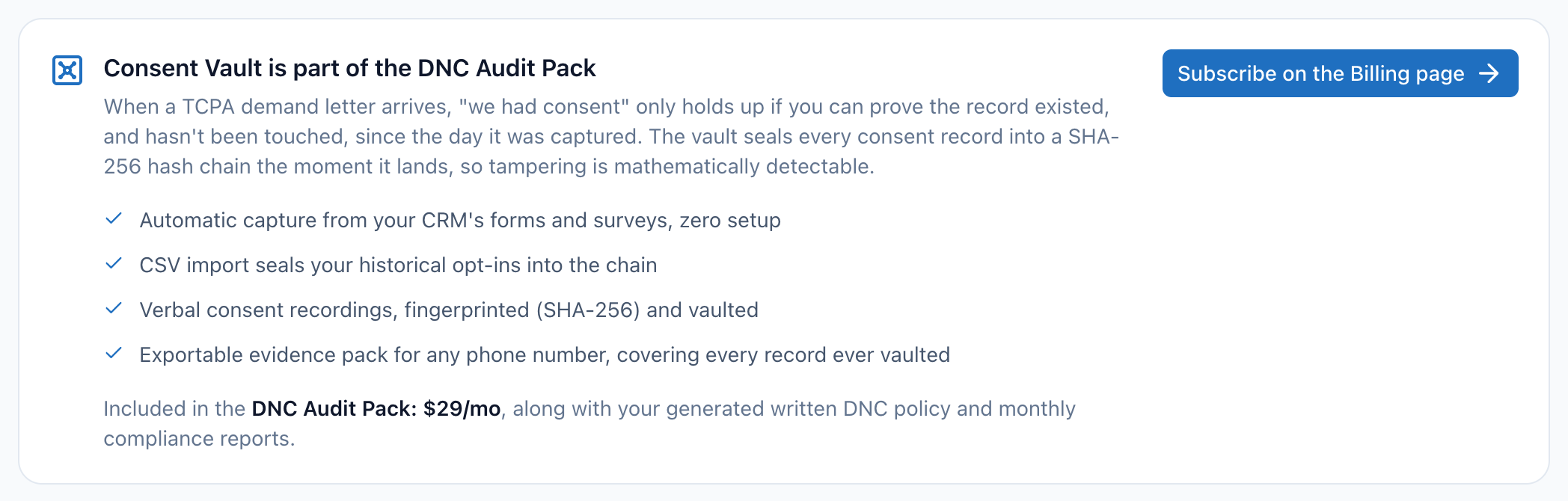
- The Consent Vault comes with the DNC Audit Pack, along with the written policy and monthly reports.
- Subscribe on the Billing page takes you to the DNC Audit Pack subscription.
See your current plan in your CRM
Step 1. Open Billing
Open DialClear from your CRM's left menu and choose Billing at the bottom of the DialClear menu.
Step 2. Read the plan line
The line under the Billing heading names your plan, for example "This account is on the Clear plan."
Change your CRM plan
Step 1. Open the App Marketplace
In your CRM, open the App Marketplace and go to Installed Apps.
Step 2. Choose a new plan
Find DialClear, open it, choose the plan you want and confirm. Your CRM handles that billing.
Step 3. Reload DialClear
The menu follows the new plan once your CRM tells DialClear about the change. If a section has not appeared yet, reload DialClear from your CRM's left menu. There is no need to reinstall.
Add a subscription on a direct account
Step 1. Add a card if you have not
Open Billing. The Subscribe buttons stay grayed out until a card is saved.
Step 2. Subscribe
Under Compliance subscriptions, choose Subscribe next to Solo Shield or the DNC Audit Pack. If your bank asks you to confirm the first charge, follow the prompt. Once it shows Active, the page opens up.
Subscriptions renew each month at the listed price. When you cancel, the feature stays on until the end of the period you already paid for, and the cancel can be undone before then. See Manage billing and subscriptions.
Frequently asked questions
I upgraded but the new section is not showing
Reload DialClear inside your CRM. If it still does not appear after a minute, email support@dialclear.co with your sub account name and we will check the plan.
I downgraded or canceled. What happens to my data?
Your records stay. Consent Vault records and past compliance reports are kept, and they show again once you are back on a plan or subscription that includes them.
Does my plan change how lookups are billed?
No. Inside your CRM, lookups bill your CRM wallet at the same per lookup price on every plan.
Can I buy Solo Shield inside my CRM?
No. Inside your CRM the App Marketplace plan is what counts. Choose the Shield plan or Compliance Suite there.