
Finding and exporting past lookups
Filter, search and sort your lookup history, open a full record, scrub a contact again, and download it all as a CSV file.
7 min read
Tip
Export CSV downloads every lookup that matches your filters, across all pages.
The History card on Lookups keeps the lookups DialClear has run for you, newest first, 25 to a page.
What it shows depends on where you are working. In a CRM account, either inside your CRM or picked in the account switcher, it shows every lookup the account paid for. Those are its contacts screened automatically or from a tag, lookups run by hand and billed to its wallet, bulk files billed to its wallet, Protection rescreens of its contacts, and Off CRM Protection rescreens charged to its wallet. If you do not belong to any CRM account, it shows every lookup you ran yourself. A lookup paid from your token balance while you belong to a CRM account is not part of that account's history.
Narrow down the list

- Show all lookups, or only one kind.
- Search everything in each record, the number, the address and the result.
- Sort newest first or oldest first.
- Limit the list to a date range. Both dates are included in full.
- Export CSV downloads every lookup that matches the filters you set.
Step 1. Pick a kind of lookup
Choose All, Phone scrub, Trusted contact or Geolocation at the top right of the card.
Step 2. Search
Type in Search all records…. The search looks through everything stored on each lookup, including fields that are hidden until you open a row. Part of a phone number works, and so does a flag such as federal-dnc, a city, or a name.
Step 3. Sort and pick dates
Choose Newest or Oldest. To see one period, set From and To. The dates follow your own time zone and include the whole of both days.
A Clear button appears once you change anything. It puts every filter back the way it started.
When there are more than 25 matches, page controls appear under the list.
Read a row
Each row shows the Service, the Query you looked up, the Result, the Source, and When it ran. The source tells you how the lookup started.
| Source | Meaning |
|---|---|
Manual |
You ran it from the lookup card, or chose Re-scrub now on a row. |
Api |
It came in through an API key. |
Csv |
It came from a bulk file. |
Protection |
It was an Off CRM Protection rescreen from Protection. |
Shield |
Shield copied a flag onto this contact after the same number was flagged in another account in your agency. |
Webhook |
It ran on a contact in your CRM, automatically, from a tag, or as a CRM Protection rescreen. |
Reading a lookup result explains what each result means.
Open the full record
Click a row to open it. Full record lists every field DialClear saved, both what you sent and what came back. Click the row again to close it.
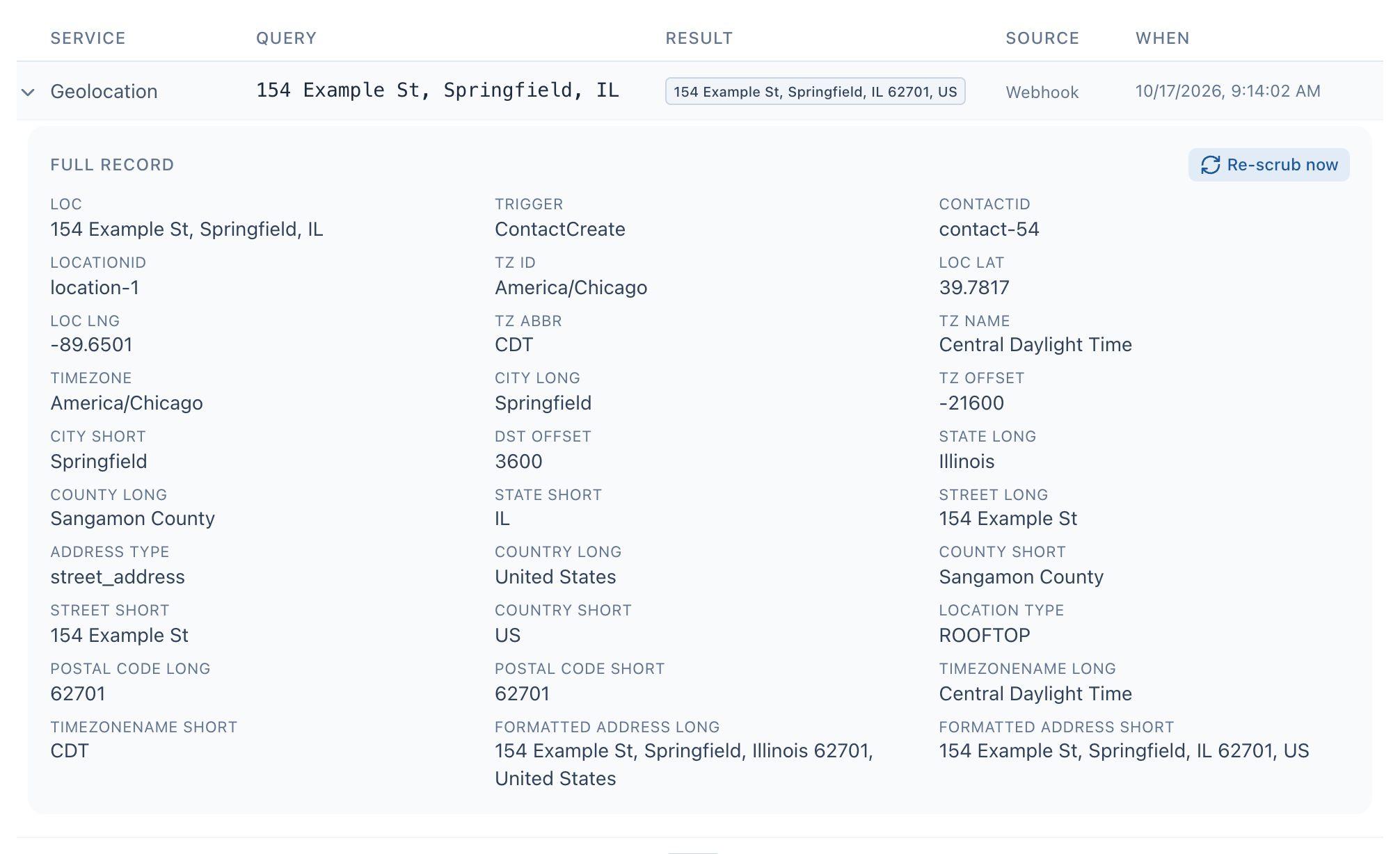
- Click a row to open or close its full record.
- Full record lists every field saved with the lookup.
- Re-scrub now runs a fresh, charged lookup on the CRM contact this row came from.
Scrub a contact again
Re-scrub now appears in the full record of a Phone scrub or Geolocation row that came from a contact in your CRM. It gives you a fresh answer for that contact today.
When you choose it, DialClear reads the contact's current phone number or address from your CRM, runs a new lookup, and writes the result back onto the contact. It runs even if your automatic settings are off or the contact was screened earlier today.
Warning
Re-scrub now is charged as one lookup to the CRM account's wallet at your normal price, every time you choose it.
On a Phone scrub row, a Date of consent or last contact box sits next to the button. When your account has the premium reassigned number check on, the re-scrub runs that check only with a date in this box, because a safe harbor needs a consent dated check. Leave it empty and the re-scrub runs the standard screen at the standard price, and the note next to the button says the check did not run.
A short note next to the button says Re-scrubbed. when it worked, and the new lookup appears at the top of the list. If it says Skipped it gives the reason.
The button does not appear on trusted contact rows, or on lookups you ran by hand or from a file, because there is no CRM contact to update.
Export to a CSV file
Set the filters you want, then choose Export CSV. The download holds every lookup that matches, across all pages. It is named with today's date, for example dialclear-history-2026-10-08.csv.
The columns depend on which kinds of lookup are in the export.
| Column | Included when |
|---|---|
| Date, Service, Query, Source | Always. The date is in UTC, and the source is written in lowercase, for example manual. |
| Scrub Status, Flags, Wireless | The export has phone scrubs. Scrub Status is Clean or Flagged. |
| Timezone, Formatted Address, State, ZIP, Latitude, Longitude | The export has geolocation lookups. |
| Grade | The export has trusted contact lookups. |
The button is grayed out when no lookups match your filters.
Frequently asked questions
Why does Re-scrub now say the contact has no phone number?
The contact in your CRM no longer has a phone number, or has no state or ZIP for an address lookup. Add it on the contact and try again.
Can I export just one kind of lookup?
Yes. Pick Phone scrub, Trusted contact or Geolocation first. The export follows whatever filters are set.
Is a lookup from a bulk file in my history too?
Yes. Every number and address in the file is saved with the source Csv. A file billed to a CRM account's wallet appears in that account's history, for everyone who works in the account. If you do not belong to any CRM account, the file is paid from your token balance and appears in your own history. Files run before this changed appear in the account's history wherever DialClear's billing records show which account paid for them.
Why does a note say some scrubs were processed on our previous engine?
If your account moved to DialClear from our previous engine, scrubs from before the move date were not run by DialClear, so only their number is kept. A note above the list reads, for example, 1,204 scrubs up to October 28, 2026 were processed on our previous engine, detailed results unavailable. Every lookup DialClear ran shows in the list in full, as normal. A CSV export carries the same note on its last line, below the lookups. The note does not appear while you search, because a count cannot match a search.
Why can I not use Re-scrub now?
Re-scrub now spends the CRM account's wallet, so it needs permission to make changes in that account. Without it, the button answers that you have read only access. Ask whoever manages the account to give you access under Team access on Settings.