
Keeping your numbers screened every 30 days
Turn on Protection so the numbers you already screened are checked again every 30 days, leave out numbers that do not need it, and get an email when one turns flagged.
11 min read
Before you start
- At least one number already screened by DialClear
Tip
CRM protection is a setting of the CRM account. Anyone with the `Admin` role in your CRM can turn it on, and it covers everyone on the account.
Do Not Call lists change every day. A number that was clean last month can be on a list today. Protection takes the numbers DialClear has already screened for you and screens them again every 30 days, so your results stay recent. When a number that used to be clean comes back flagged, you get an email.
Protection is free to turn on. Each number it screens again is charged as one phone scrub.
Note
Screening on a schedule is one part of a Do Not Call program. It does not by itself give you safe harbor, and this article is not legal advice.
Choose what Protection covers
Open Protection from the left menu. The page is titled 30-Day Protection. It has two kinds of switch, and you can turn on either one or both.
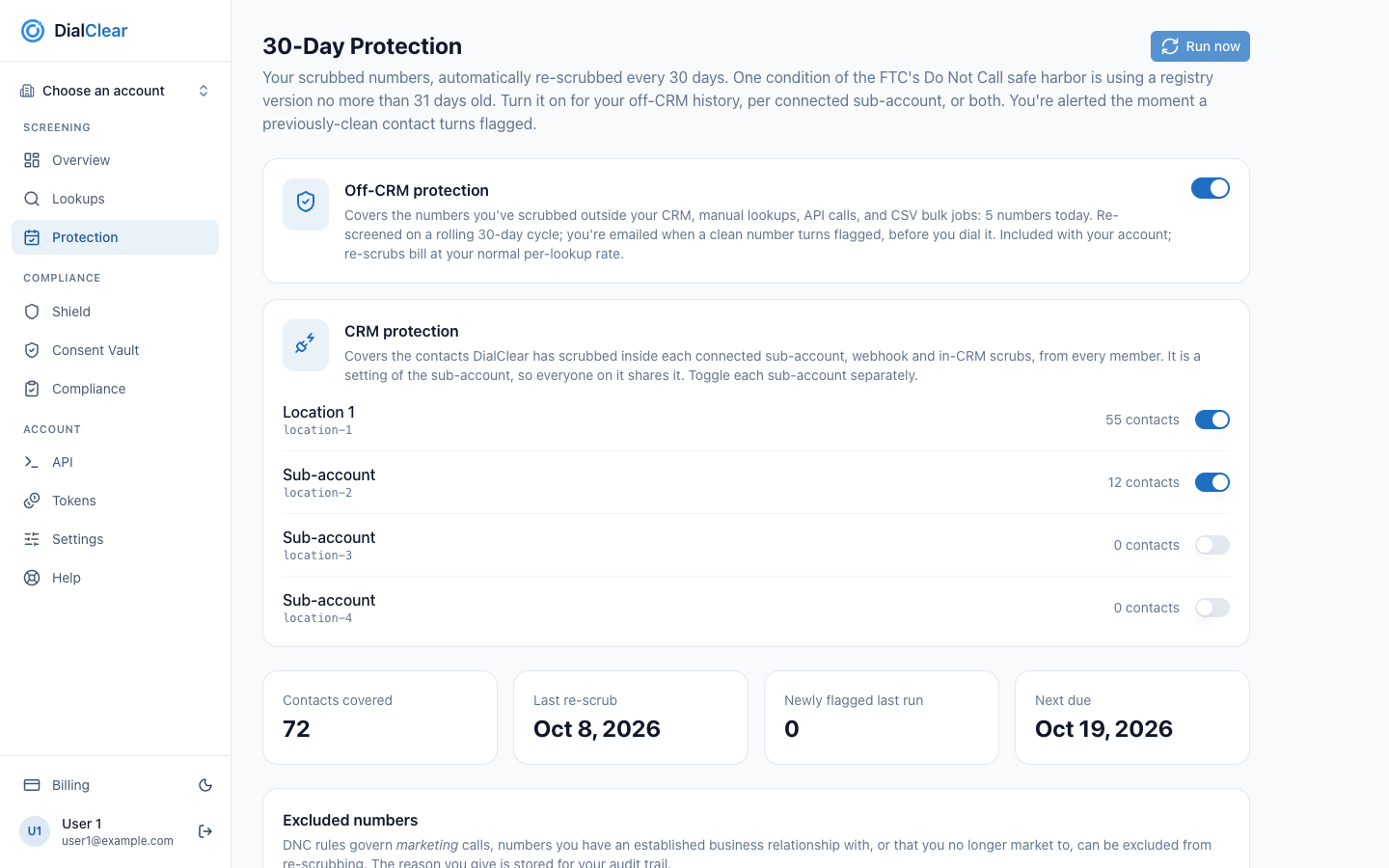
- Off-CRM protection covers numbers you screened from your token balance and numbers from bulk files.
- CRM protection covers the contacts DialClear screened inside each connected CRM account, one switch per account.
- The tiles show roughly how many contacts are covered, when the last run finished, what it found, and when the next one is due.
- Run now lets you start a run yourself. It appears once any switch is on.
Step 1. Turn on Off-CRM protection
Turn on the switch on the Off-CRM protection card. It covers the numbers you screened outside a CRM account. That means lookups you ran by hand or through an API key and paid from your token balance, plus every number from a bulk file. The card shows how many numbers that is today.
A lookup you ran by hand or through the API and billed to a CRM wallet is not covered by either switch.

- The switch. On means these numbers are screened again every 30 days.
If you belong to exactly one CRM account, these rescreens are charged to that account's CRM wallet. Otherwise they come from your token balance.
Step 2. Turn on CRM protection for each account
The CRM protection card lists every CRM account you are connected to, with the number of contacts DialClear has phone screened in it. Turn on the switch for each account you want covered.
CRM protection belongs to the CRM account, not to you. It covers every contact DialClear has screened in that account, whoever's screen it was, and everyone on the account sees the same switch, the same count and the same runs.
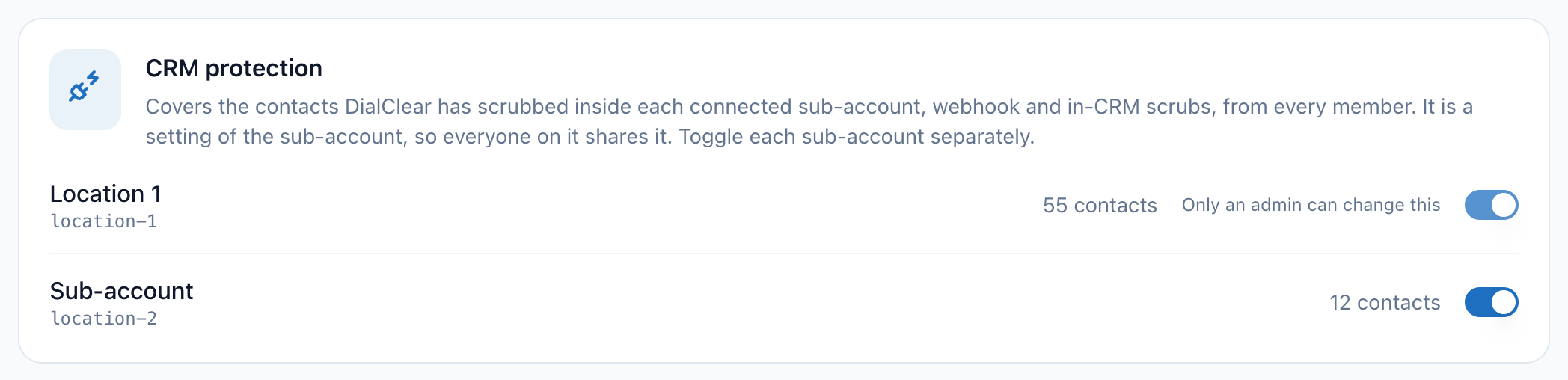
- One switch per connected account. Each account is turned on separately.
Important
Only people with the Admin role in your CRM can turn an account's switch on or off. For everyone else the switch is grayed out and says so. Ask someone with the Admin role to change it.
The role comes from your CRM. When someone's role changes in the CRM, DialClear picks up the change the next time they open DialClear from the CRM.
Note
CRM protection used to be a switch for each person, and it covered only the contacts that person had screened. It is now an account setting. Every account where someone on it had the old switch on was turned on. The account switch covers, and charges the account's wallet for, every contact screened in the account, including contacts screened by people who had the old switch off.
When Protection screens a CRM contact again, it writes the new result onto the contact in your CRM and applies your Automatic DND settings, the same way an automatic screen does. The charge goes to that account's CRM wallet. When the premium reassigned number check is on in Automatic scrubbing, each CRM rescreen runs it and is charged the premium price.
A short message confirms each change.
If the switches are grayed out
Protection is in every plan, so nobody needs to buy anything to use it. Changing it is a different matter. Inside a CRM account, only people with the Admin role in your CRM, and team members they have let in, can change Protection. Everyone else sees the page read-only. A notice at the top says so, and the switches, Run now and Exclude are grayed out. The numbers and the run history still show.
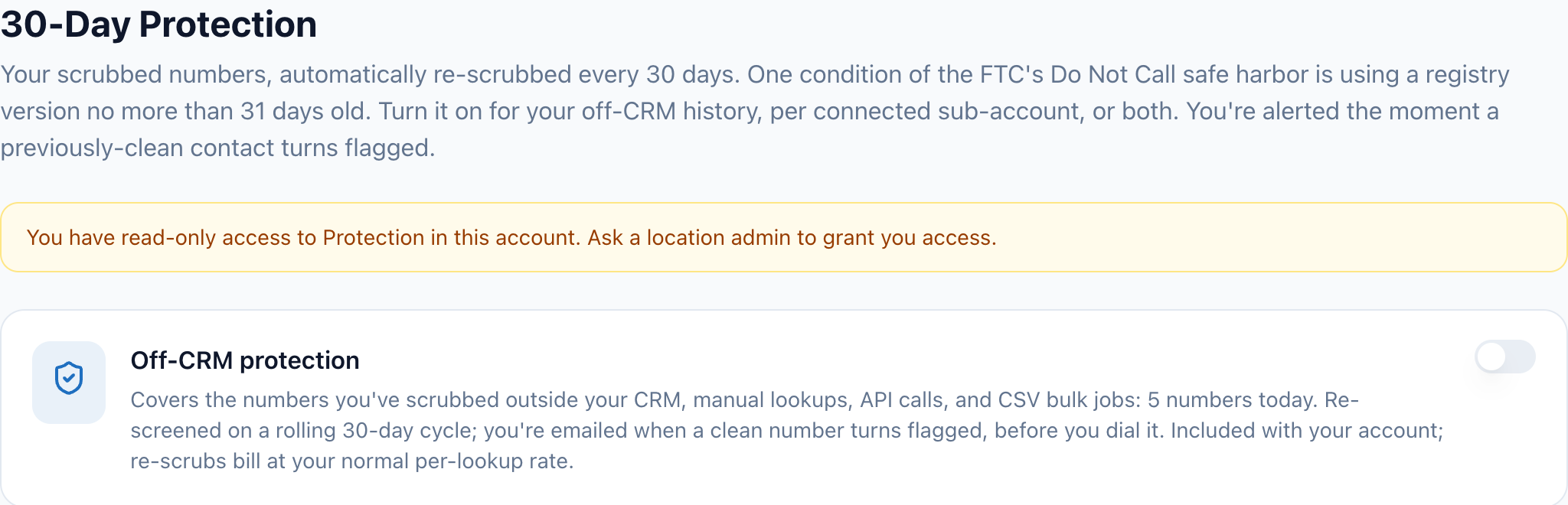 (opens full size in a new tab)
To make changes, ask someone with the Admin role in that CRM account to let you in on the Team access card. See Giving your team access to DialClear.
Tip
A number covered by both switches is only screened once per cycle, so you are never charged twice for it.
When it runs
For Off-CRM protection, your first run starts on its own, usually within a day of turning the switch on. After that, a new run starts 30 days after the last one finished.
In a CRM account, each contact keeps its own date. A contact is screened again within 30 days of the last time it was screened, whoever screened it. A run of a CRM account takes only the contacts whose date has come up, so a contact screened last week is not screened again until its own 30 days are nearly up. A CRM account runs on any day that one of its contacts comes due.
You can also start a run yourself. Run now appears at the top right of the page once any switch is on. It works when a run is due and none is in progress. Between runs it is grayed out, and the Next due tile shows the date.
Each CRM account runs on its own contacts' dates, and your Off-CRM protection keeps its own 30 day cycle. A run of a CRM account is the account's run. Anyone on the account can start it when it is due, and everyone on the account sees it in Run history.
While a run is going, a progress bar shows how many contacts are done. You can leave the page. The run keeps going.
Read the summary and run history
The four tiles near the top of the page give you the state at a glance.

- Contacts covered is how many numbers the switches that are on keep screened. In a CRM account a run screens only the contacts that have come due. A number covered by both switches can be counted twice here.
- Last re-scrub is the date the last run finished.
- Newly flagged last run counts numbers that were clean before and came back flagged.
- Next due shows when the next contact comes due, or Due now.
Run history at the bottom of the page lists each run with its start time, how many contacts it covered, and how many were newly flagged. A run is marked Running, Done or Stalled. A stalled run stopped partway. The next run picks the numbers up again.
The email when a number turns flagged
When a run finds numbers that were clean on their last screen and are flagged now, DialClear sends an email once the run finishes. For a CRM account, it goes to everyone with the Admin role in that account. For Off-CRM protection, it goes to the address you sign in with. The email shows how many numbers turned flagged and lists up to 10 of them with the lists they were found on, with a link to the rest on Lookups. Review those numbers before anyone dials them.
Each rescreen is saved to your history. A CRM rescreen shows the source Webhook and appears while you are working in that CRM account. An Off CRM rescreen shows the source Protection. When it is charged to a CRM account's wallet it appears in that account's history. There are two exceptions. A number that came from a file billed to a different CRM account stays out of the paying account's history, so one account never sees another account's leads. A number from a bulk file that DialClear cannot tie to one account, such as a file paid from your token balance, stays out of it too. A rescreen paid from your token balance appears only if you do not belong to any CRM account.
Leave a number out of Protection
Some numbers do not need to be screened every 30 days, for example a current customer, or a number you no longer market to. The Excluded numbers card on the same page takes a number out of Protection. The reason you give is saved with it.
When you are working in a CRM account, a number you exclude goes on that account's list. Everyone on the account sees it, and CRM protection for the account skips it. Only people with the Admin role in the account can add a number to that list or take one off it. Anyone else adds numbers to their own Off-CRM list. To leave a number out of your Off-CRM protection only, pick My off-CRM history in the box next to the reason. Those rows are marked Off-CRM only. Off-CRM protection also skips every number you excluded yourself on a CRM account.
Note
Do Not Call rules cover marketing calls. Whether a number can safely be left out is your decision, and if you are unsure, ask your attorney.
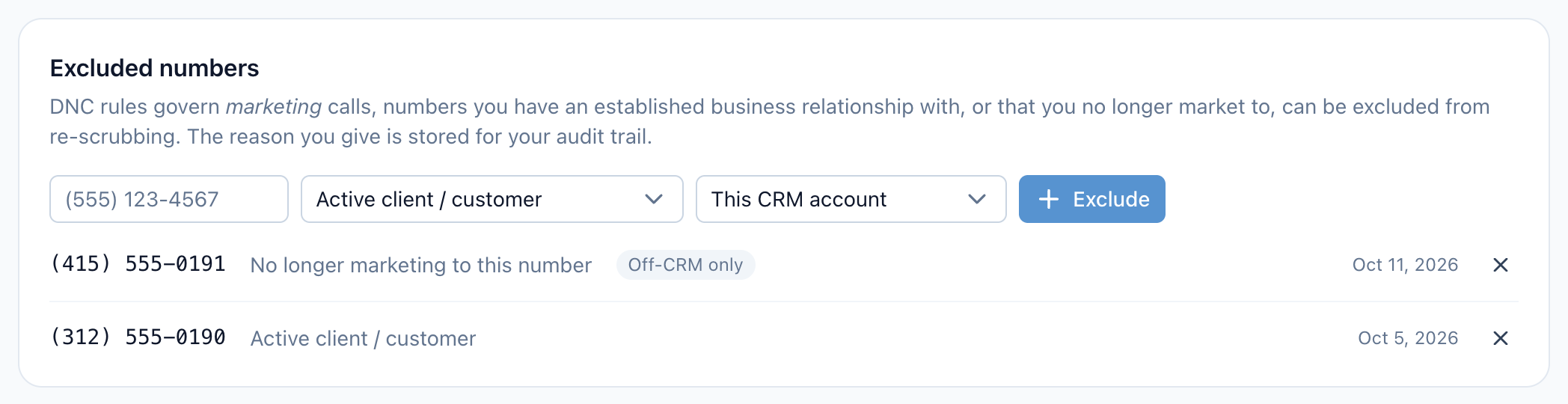
- Type the 10 digit phone number to leave out.
- Pick why the number is being left out. The reason is saved for your audit trail.
- Exclude adds the number to the list.
- Each excluded number shows its reason and the date you added it. The X at the end of a row puts it back under Protection.
Step 1. Type the number
Scroll to Excluded numbers and type the number in the phone box. Any common format works as long as it has all 10 digits.
Step 2. Pick a reason
Choose one from the list.
| Reason | When to use it |
|---|---|
| Active client / customer | You have a current relationship with this person. |
| No longer marketing to this number | You have stopped calling this number for sales. |
| Other | Anything else. A box appears, and you must type the reason. Only the first 200 characters are saved. |
Step 3. Choose Exclude
Choose Exclude. A message confirms it, and the number appears in the list with its reason and the date you added it. Protection skips it from the next run on.
Adding a number that is already on the list replaces its reason with the new one. To put a number back under Protection, choose the X at the end of its row.
Leaving a number out of Protection does not stop other screening. Automatic screening in your CRM, tags, manual lookups and bulk files still screen it.
Frequently asked questions
What does Protection cost?
Turning it on is free. Each number screened in a run is charged as one phone scrub, $0.07 at today's list price or 7 tokens. A CRM rescreen with the premium reassigned number check turned on in Automatic scrubbing costs the premium price, $0.15 at today's list price. A CRM account keeps the prices it had when DialClear was installed. Excluded numbers are never screened, so they cost nothing.
Why is Run now grayed out?
A run is already in progress, or nothing is due yet. Nothing is due until a contact's own 30 days are nearly up. The Next due tile shows when the next one is due. If you do not see Run now at all, no switch is on yet.
Why does CRM protection show 0 contacts for my account?
DialClear has not phone screened any contacts in that account yet. The count includes contacts screened for everyone on the account.
Why can I not turn on CRM protection for an account?
You do not have the Admin role in that CRM account. CRM protection is an account setting, so only people with the Admin role can change it.
Why can I not change the account's excluded numbers?
You do not have the Admin role in that CRM account. The account's list is an account setting, so only people with the Admin role can add to it or remove from it. The X is grayed out on the account's rows. You can still add numbers to your own Off-CRM list.
Why is the Exclude button grayed out?
The number has fewer than 10 digits, or you picked Other and left the reason empty.
Does Protection screen addresses or run contact verification?
No. Protection only runs phone screening.
I turned a switch off. What happens to past results?
Nothing. Your history stays as it is. Protection stops screening those numbers from the next run on.