
Looking up one number by hand
Screen a phone number, verify a name against a number, or look up an address from the Lookups page.
7 min read
Before you start
- Tokens on a direct account, or a connected CRM account that pays from its wallet
Tip
Every lookup you run here is saved to your history, so you never need to copy a result down.
The manual lookup card at the top of Lookups runs one lookup at a time. Use it when you want an answer on a single lead right now, without waiting for a contact to land in your CRM.
There are three kinds of lookup, each on its own tab.
| Tab | What it checks | What you type |
|---|---|---|
| Phone scrub | Do Not Call lists, litigator lists and whether the line is wireless | A phone number |
| Geolocation | A clean, standard address with its time zone | A street address or a ZIP code |
| Trusted contact | Whether a name really belongs to a phone number | A phone number and a name, plus an email if you have one |
Screen a phone number
Step 1. Open Lookups and pick Phone scrub
Open Lookups from the left menu. Phone scrub is the tab selected when the page opens.
Step 2. Enter the number and run it
Type the number in Phone number. A 10 digit US number works with or without the leading +1, and spaces, dots and brackets are fine. Then choose Run lookup.
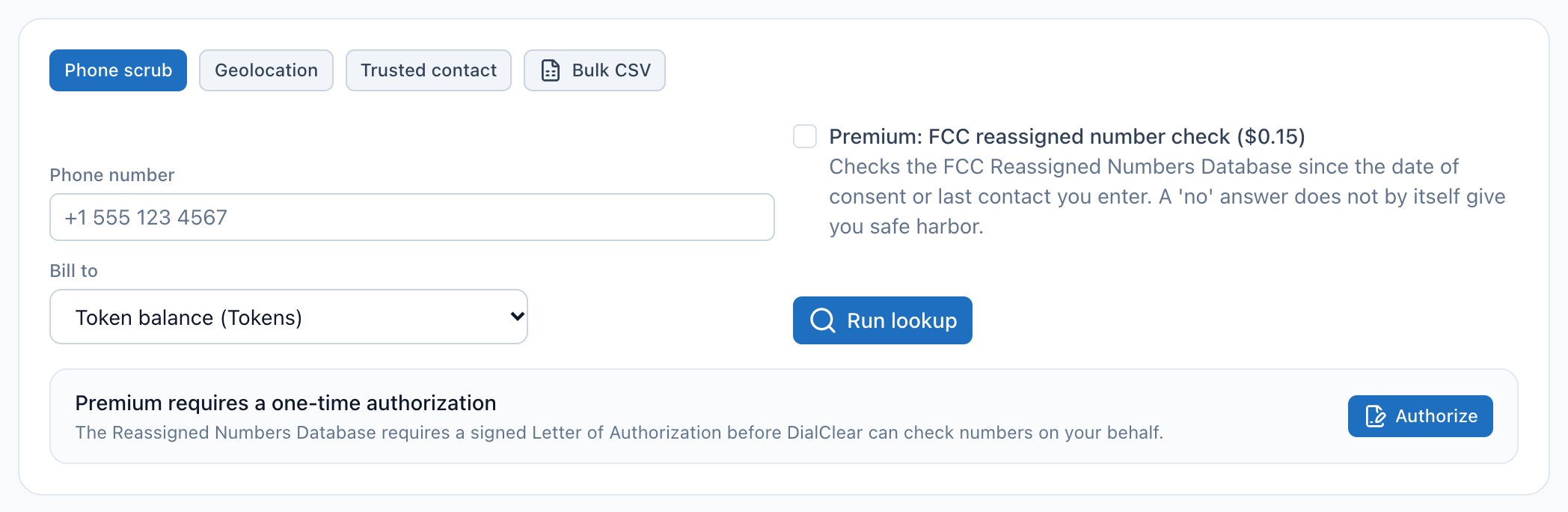
- Type the phone number you want to screen here.
- The premium reassigned number check. It stays grayed out until your Letter of Authorization is approved.
- Bill to picks who pays for this lookup, here your token balance. You only see it when you can bill more than one place.
- Run lookup sends the request. The result appears under the card a moment later.
- The authorization prompt. Choose Authorize here to sign the Letter of Authorization the premium check needs.
The result shows under the card, and the same lookup is added to the top of your history. Reading a lookup result explains every flag.
Verify a name against a number
Step 1. Pick Trusted contact
Choose the Trusted contact tab. Fill in Phone number and Name to verify. Both are required. Email (optional) can be left empty. It is saved with lookups billed to your token balance, and a lookup billed to a CRM wallet ignores it.
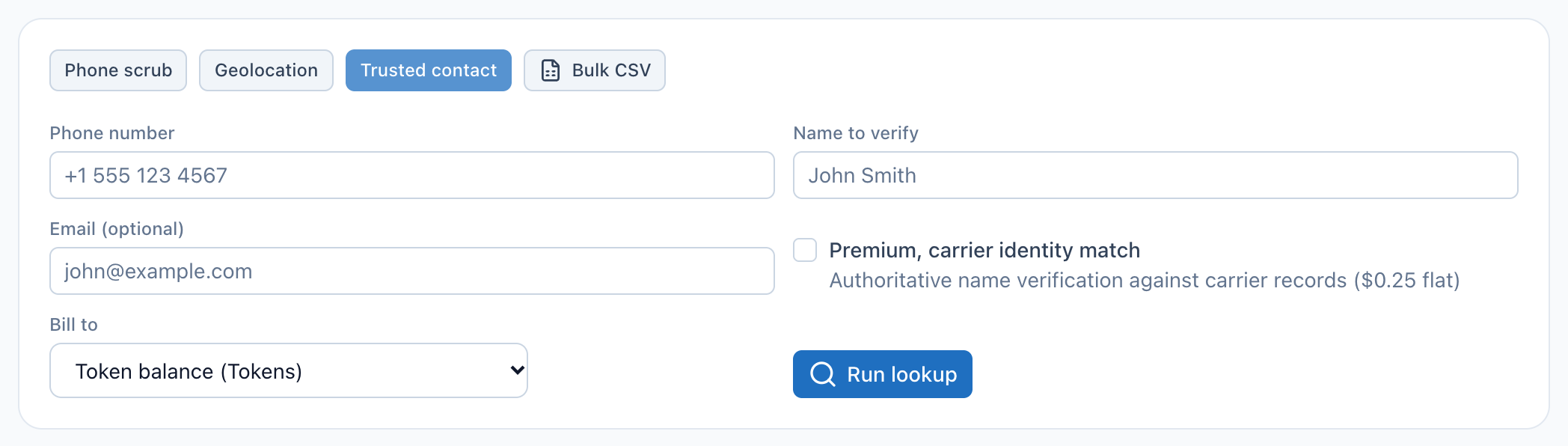
- Type the full name you expect to own the number.
- The email is optional. A lookup billed to a CRM wallet ignores it.
- The premium carrier identity match checks the name against the carrier's own records.
- Run lookup sends the request.
Step 2. Run it
Choose Run lookup. You get a score from 0 to 100 and a letter grade. Reading a lookup result explains what moves the score.
Look up an address
Step 1. Pick Geolocation
Choose the Geolocation tab and type an address or a ZIP code in Address or ZIP. A full street address gives the most exact answer.
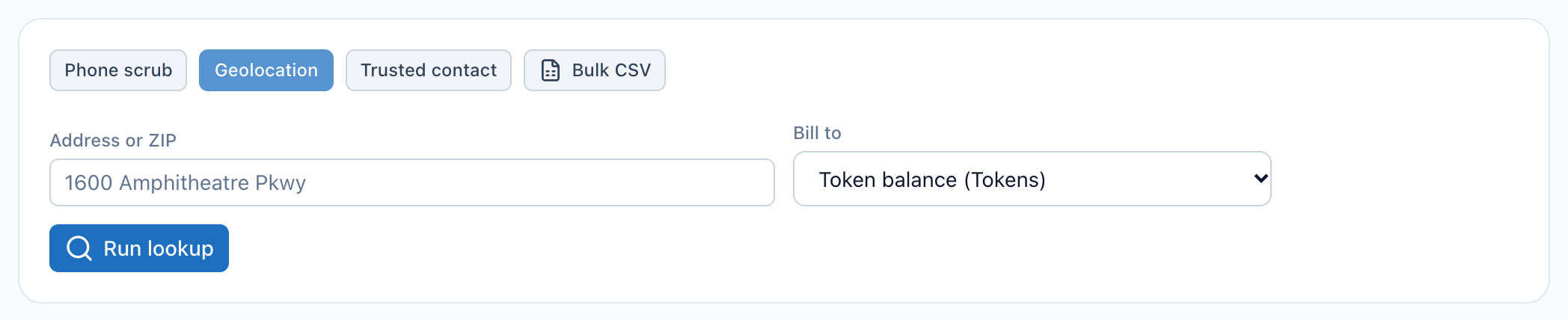
- The Geolocation tab. Each tab swaps the boxes below it for the ones that lookup needs.
- Type a street address, or just a ZIP code.
- Run lookup returns the standard address, county, coordinates and time zone.
Step 2. Run it
Choose Run lookup. The result gives you the address written the standard way, plus the time zone, which tells you what time it is where the contact lives.
What each lookup costs
Every lookup is charged once, when you run it. A lookup that fails or returns nothing usable is not charged, and the page tells you so.
| Lookup | CRM wallet, today's list price | Token balance |
|---|---|---|
| Phone scrub | $0.07 | 7 tokens |
| Phone scrub with the premium reassigned number check | $0.15 | 15 tokens |
| Trusted contact | $0.08 | 8 tokens |
| Trusted contact with the premium carrier identity match | $0.25 | 25 tokens |
| Geolocation | $0.08 | 8 tokens |
Note
A CRM account keeps the prices it had when DialClear was installed, so an older account may see slightly different numbers than the list above.
If the premium carrier identity match is unavailable for a number, the lookup runs as a standard one and you are charged the standard price.
Choose who pays with Bill to
Bill to appears when you can pay for a lookup in more than one place. It lists each CRM account you belong to, marked CRM wallet, and your Token balance if you have a card on file. Pick one before you choose Run lookup. After the lookup runs, a line under the button confirms where it was billed.
When you open DialClear from inside your CRM, the picker is hidden. Lookups there are always billed to the account you are working in.
Important
On a lookup billed to a CRM wallet, the premium carrier identity match follows the premium setting in Automatic scrubbing on Settings. The premium reassigned number check runs only when you check its box on this card, on any bill to, because it needs a date you choose.
The premium reassigned number check
The premium phone check asks the FCC Reassigned Numbers Database whether the number was permanently disconnected since a date you give. If it was, the result gets a reassigned-number flag. The box stays grayed out until your business has signed a Letter of Authorization and it has been approved. The Authorize prompt under the phone form starts that. Checking for reassigned numbers covers signing the letter and turning the check on.
Once the box is checked, a Date of consent or last contact box appears, and it is required. Enter the date this person gave you consent, or the last date you know you reached them at this number. The check asks whether the number was disconnected since then. DialClear never fills in a date for you here, because a date you did not choose cannot support a safe harbor. The date cannot be in the future.
Note
Whether a result from the Reassigned Numbers Database gives you any legal protection is a question for your attorney. DialClear reports what the database says.
Troubleshooting
Run lookup is grayed out
You have no way to pay for a lookup yet. Add a card on Billing and buy tokens, or open DialClear from a CRM account that has it installed. If your service has been canceled, the page says so at the top and lookups stay off until it is reactivated.
It says the account has insufficient wallet funds
The CRM wallet that pays for this lookup is empty. Add funds in your CRM, then run the lookup again. Nothing was charged.
It says no usable result for that input
The number or address could not be matched to anything. Check it for typos. You were not charged.
The premium box is grayed out
Your Letter of Authorization has not been approved yet. The prompt under the form shows where it stands.
It says my token balance is too low
Your token balance cannot cover this lookup. Buy more tokens on Tokens, then run it again. Nothing was charged.
Does a manual lookup update the contact in my CRM?
No. A manual lookup is saved to your history only. To screen a contact and write the result onto it, add a tag to the contact. See Scrub a contact by tagging it.