
Buy tokens for your lookups
See your token balance, what each lookup costs, and how to buy more tokens with the card on file.
4 min read
Before you start
- A DialClear account created at dialclear.co
- A card saved on the Billing page
Tip
Quick amounts of $50, $100 and $150 sit right where the price per token drops.
If you signed up at dialclear.co, every lookup spends tokens from a balance you buy ahead of time. Inside your CRM you never need tokens, because lookups bill your CRM wallet.
One token is one cent at list price. Your balance starts at zero, and lookups do not run until you buy tokens.
What a lookup costs
| Lookup | Tokens |
|---|---|
| Phone screening | 7 |
| Phone screening premium | 15 |
| Location lookup | 8 |
| Contact verification | 8 |
| Contact verification premium | 25 |
A lookup that fails is not charged. Its tokens go straight back to your balance. The same table is on the Tokens page.
See your balance
Open Tokens in the left menu. Your balance is the large number at the top of the page, with a list of your recent purchases and lookups further down.
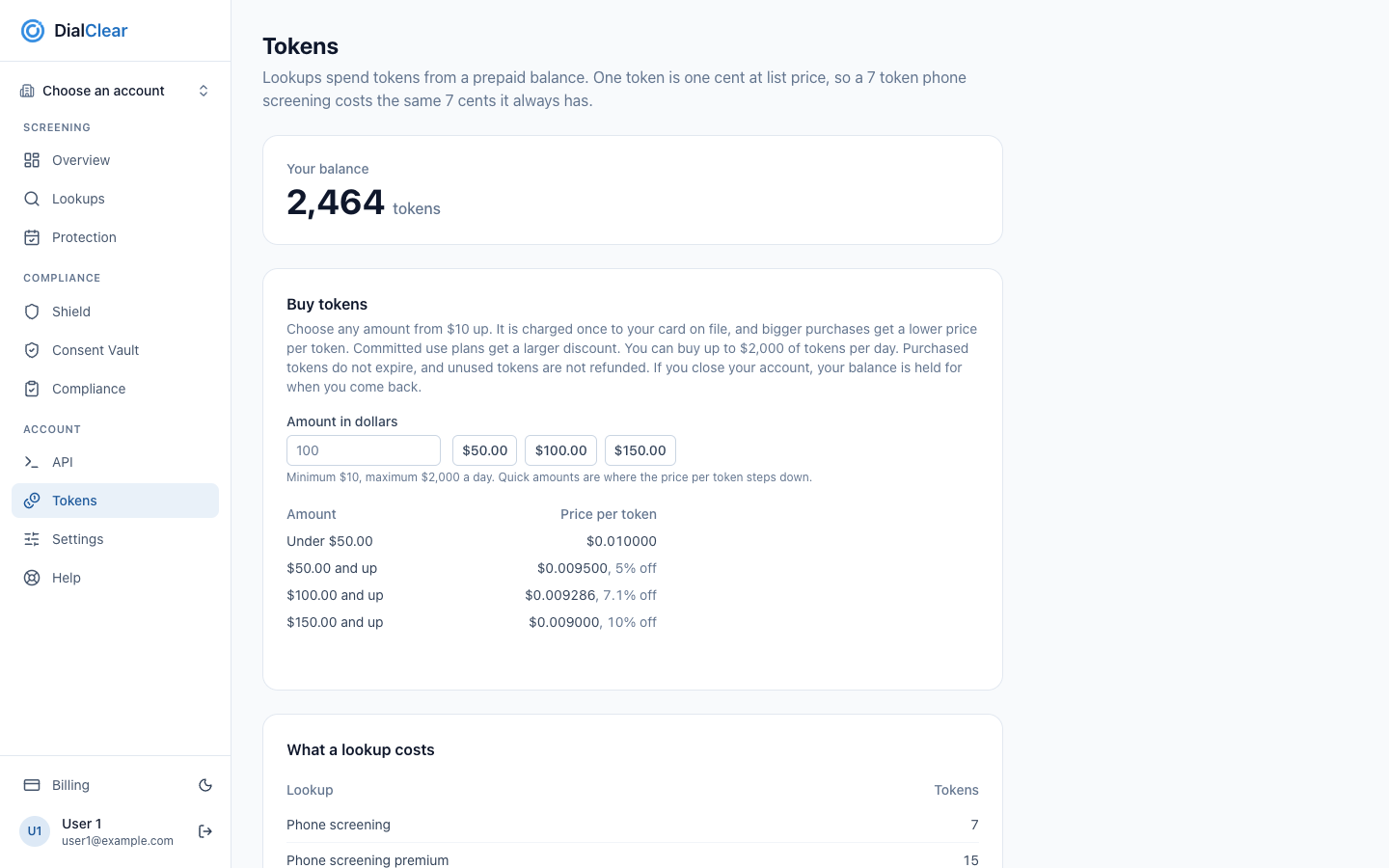
- Your balance, the number of tokens you have left to spend on lookups.
- Type an amount in dollars, or choose $50, $100 or $150.
- The price per token for each amount. Bigger purchases get a lower price.
- Tokens in the left menu. It only appears in the portal at dialclear.co.
Buy tokens
Step 1. Add a card if you have not
Buying uses the card on file. See Manage billing and subscriptions.
Step 2. Choose an amount
On Tokens, under Buy tokens, type any amount from $10, or choose $50, $100 or $150.
Step 3. Check the quote
The line under the amount shows exactly how many tokens you get and the price of each one.
Step 4. Buy
Choose the Buy button, which repeats the tokens and the amount. If your bank asks you to confirm the payment, follow the prompt on screen. A message tells you when the tokens are in your balance, usually within seconds.
How the price works
Your card is charged once for the amount you chose. The more you buy at once, the lower the price per token.
| Amount | Price per token |
|---|---|
| Under $50 | $0.010000 |
| $50 and up | $0.009500, 5% off |
| $100 and up | $0.009286, 7.1% off |
| $150 and up | $0.009000, 10% off |
The price for your whole amount is the price of the row it falls in. Tokens are rounded down to a whole token.
Important
You can buy up to $2,000 of tokens per day, counted by the calendar day in Mountain Time. Purchased tokens do not expire. Unused tokens are not refunded. Tokens are a prepaid credit for DialClear lookups, for business use. They have no cash value and cannot be moved to another account.
Frequently asked questions
I bought tokens and my balance has not changed
Tokens usually appear within seconds. If the page says they can take a minute, wait a minute and reload. If they are still missing, email support@dialclear.co with the date and the amount.
Can I get a refund for tokens I have not used?
No. Unused tokens are not refunded, except when DialClear closes your account without cause, covered below. Purchased tokens do not expire, so they stay on your balance until you use them.
What happens to my balance if I close my account?
To close your account, email support@dialclear.co. Your unused tokens are held on the account, so if you reopen it later you can use the same balance. They are not refunded when you ask to close it.
What if DialClear closes my account?
If DialClear closes your account without cause, you are refunded for your unused purchased tokens at the price you paid for them. If an account is closed for cause, such as breach, nonpayment or abuse, unused tokens are not refunded and the balance is not held.
What happens if a token purchase is refunded or disputed?
If a token purchase is refunded to your card, or you dispute it with your card issuer, the tokens it bought are removed from your balance. A partial refund removes the share of tokens the refunded amount bought. You get an email each time.
If some of those tokens were already spent, your balance goes below zero. Lookups do not run until a purchase brings the balance back above zero, and the next purchase pays the shortfall first. The Tokens page shows a note while this is the case.
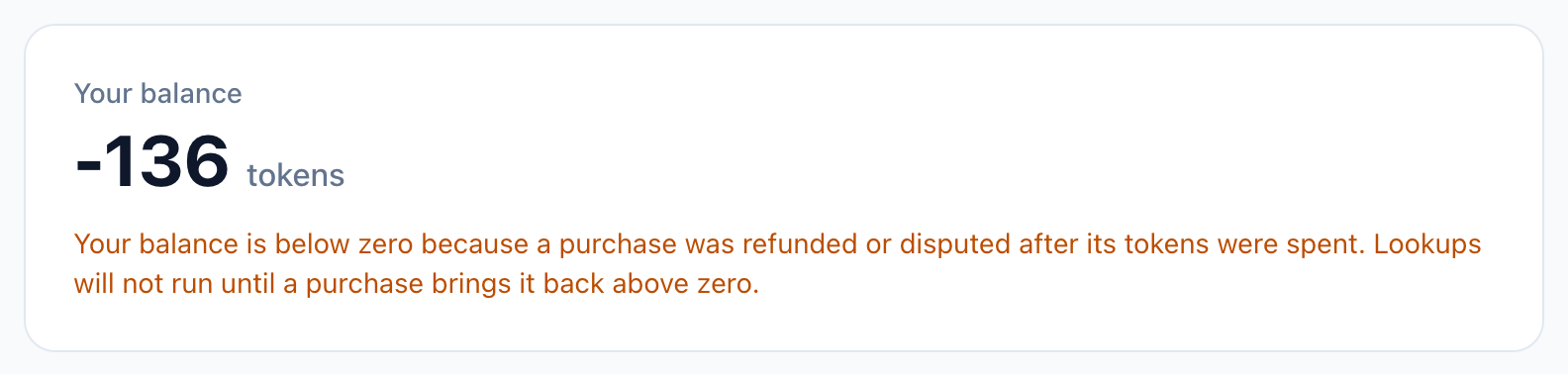 (opens full size in a new tab)
If a dispute closes in DialClear's favor, the tokens it removed are put back and you get an email.