
Using the DialClear API
Find your API key on the API page, see what each call costs in tokens, and read the reference for every endpoint.
5 min read
Before you start
- A DialClear account you sign in to at dialclear.co
- A card on file, which turns on API access
- Tokens to spend on each call
Tip
Working with contacts in your CRM? An account key from Settings is usually the better fit.
The API page gives you a key and a reference for calling DialClear from your own code. You can screen a phone number, verify a contact, look up an address, and, with the DNC Audit Pack, save consent records. Every API lookup also shows up in Lookups.
Note
The API and Tokens pages are not in the sidebar when you open DialClear inside your CRM. Sign in at dialclear.co to see them. To have your server look up a contact in your CRM, use an account key instead, as described in Let your own server look up a contact.
Get your key
Step 1. Open the API page
Sign in at dialclear.co and pick API in the sidebar.
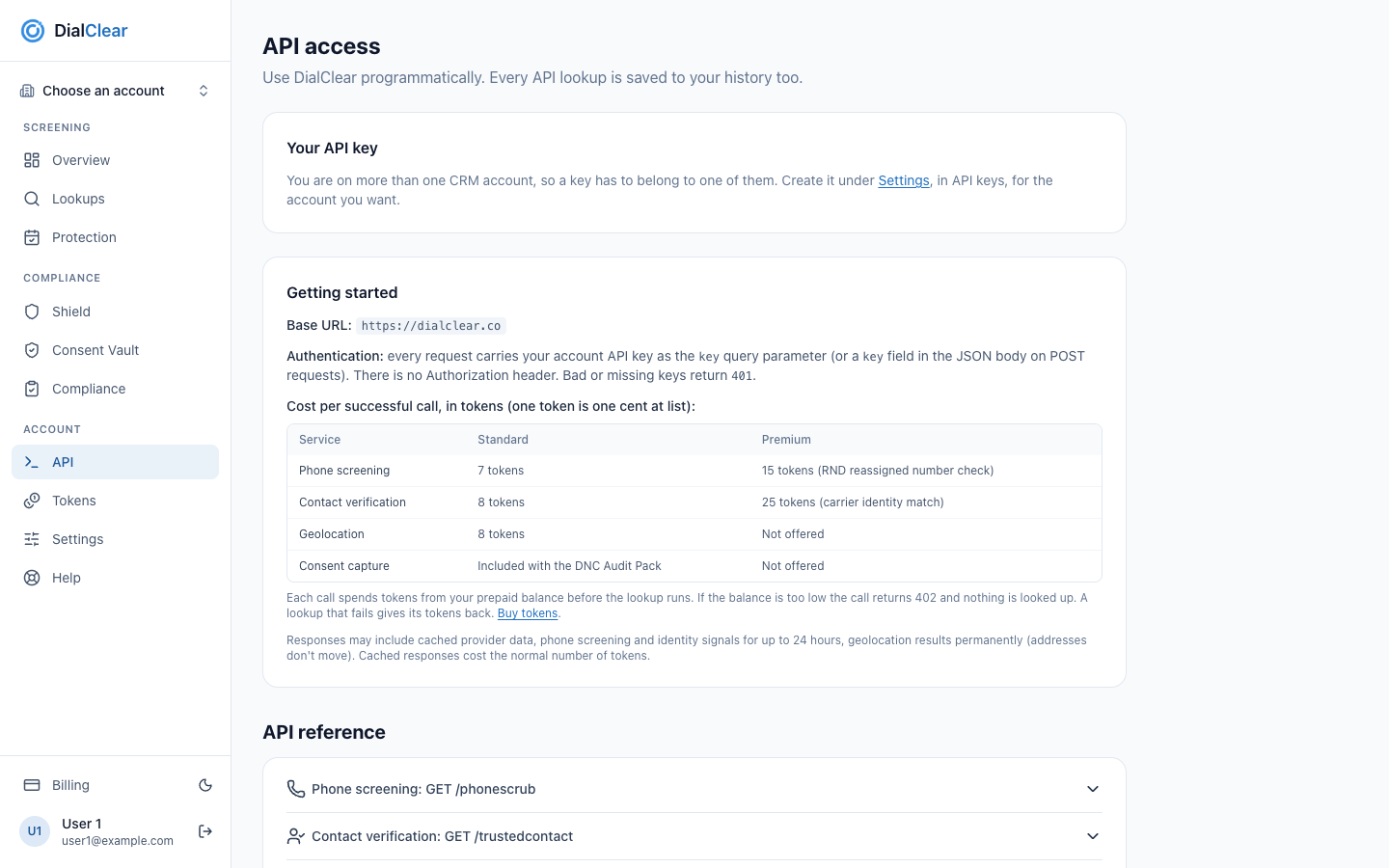
- Your API key. Your key, or a note that says what you need first, appears here.
- Getting started. The base address, how to send the key, and what each call costs.
- API reference. One entry per endpoint, with parameters, examples and errors.
Step 2. Copy the key
Select Reveal to see the whole key, or Copy to put it on your clipboard without showing it.
The card shows a note instead of a key in these cases.
| The card says | What to do |
|---|---|
| You are on more than one CRM account | Select the Settings link, scroll down to API keys at the bottom of the page, and create an account key there. See Let your own server look up a contact |
| API access turns on as soon as a valid card is on file | Add a card on Billing |
Your service has been cancelled |
Email support@dialclear.co about reactivating |

- The Settings link opens the top of the Settings page. Scroll down to the API keys card to create a key for one account.
Send a request
The key from this page goes in the key query parameter, or in a key field in the JSON body of a POST request. A missing or wrong key returns 401.
curl "https://dialclear.co/phonescrub?phone=5551234567&key=YOUR_API_KEY"
Tip
The Getting started card says there is no Authorization header. That is true for this key. Account keys from Settings are the exception, and they do use the Authorization header.
What each call costs
A direct account pays in tokens. One token is one cent at list.
| Service | Standard | Premium |
|---|---|---|
| Phone screening | 7 tokens | 15 tokens, with the reassigned number check |
| Contact verification | 8 tokens | 25 tokens, with the carrier identity match |
| Geolocation | 8 tokens | Not offered |
| Consent capture | Included with the DNC Audit Pack | Not offered |
- Tokens come out of your balance before the lookup runs. If the balance is too low, the call returns
402and nothing is looked up. See Buy tokens for lookups. - A lookup that fails gives its tokens back.
- A premium verification that falls back to standard gives back the difference.
- A request can return a stored answer. Phone screening and verification answers are reused for up to 24 hours, and address answers are kept for good. A stored answer costs the normal number of tokens.
- If your sign in is also connected to a CRM account, a request with this key can be charged to that account's wallet instead of your tokens.
The endpoints
The API reference on the page has one entry per endpoint. Open an entry to see its parameters, ready to copy examples with your key filled in, an example response, and every error.
| Endpoint | What it does |
|---|---|
GET /phonescrub |
Screens a number against Do Not Call and litigator lists. Add premium=1 for the reassigned number check |
GET /trustedcontact |
Scores how likely a name owns a number. Add premium=1 for the carrier identity match |
GET /phonescrub and /trustedcontact with an account key |
Looks up a contact in your CRM. See Let your own server look up a contact |
GET /geolocation |
Turns an address, a city and state, or a zip code into a full address and time zone. Also takes POST |
POST /api/consent/capture |
Saves a consent record. Needs the DNC Audit Pack |
Important
The premium reassigned number check needs an approved Letter of Authorization first. See Checking for reassigned numbers. Without one, a premium request returns 403 before anything is charged.
A premium phone request also needs consentDate, the date of consent or last contact as YYYY-MM-DD. There is no default. A request without it, or with a date in the future, returns 400 before anything is charged.
There is no bulk endpoint. To screen a whole list, upload a CSV on Lookups.
Frequently asked questions
Can I change my API key?
The key on this page is tied to your sign in, and the page has no button to replace it. If you think it has leaked, email support@dialclear.co. Account keys on Settings can be revoked and replaced any time.
Which key should I use?
Use an account key from Settings when you want results written to a contact in your CRM. Use the key on this page for direct lookups of any number, address or name.
Why did a call return 402?
Your token balance cannot cover the lookup. Nothing was looked up and no tokens were spent. Buy tokens and try again.