
Checking for reassigned numbers
Sign the one time Letter of Authorization, then add the FCC Reassigned Numbers Database check to every automatic phone screen.
9 min read
Before you start
- Phone screening turned on in Automatic scrubbing
- Permission to change settings in this account
- Your company name and phone number, and the full name, job title and company email of the person signing
- Access to that company email, where the letter to sign arrives
Tip
Sign the letter first. Approval takes 1 to 3 business days, and the premium checkbox stays grayed out until then.
Phone numbers get disconnected and handed to new people. The FCC keeps a Reassigned Numbers Database that answers one question. Has this number been permanently disconnected since a given date? A yes means the person you had permission to contact may no longer own the number.
The premium reassigned number check adds that question to your phone screens. Each phone screen then costs $0.15 in place of the standard $0.07.
Sign the Letter of Authorization
The Reassigned Numbers Database requires a signed Letter of Authorization before DialClear can check numbers on your behalf. You sign once per account, and the letter covers every phone screen in that account until you revoke it in writing to support@dialclear.co.
Step 1. Open the authorization form
Open Lookups from the DialClear sidebar and pick the Phone scrub tab. Under the form you see "Premium requires a one-time authorization". Select Authorize.

- The notice shows on the Phone scrub tab until your letter is approved.
- Select Authorize to open the Letter of Authorization.
Note
The note under the premium checkbox on Settings links to the Compliance page. The form itself is on the Phone scrub tab of Lookups.
Step 2. Fill in your details
The form asks for five things, which are the details the Reassigned Numbers Database requires on every letter. You do not sign on this page. DialClear emails you the letter, filled in with these details, and you sign it there.
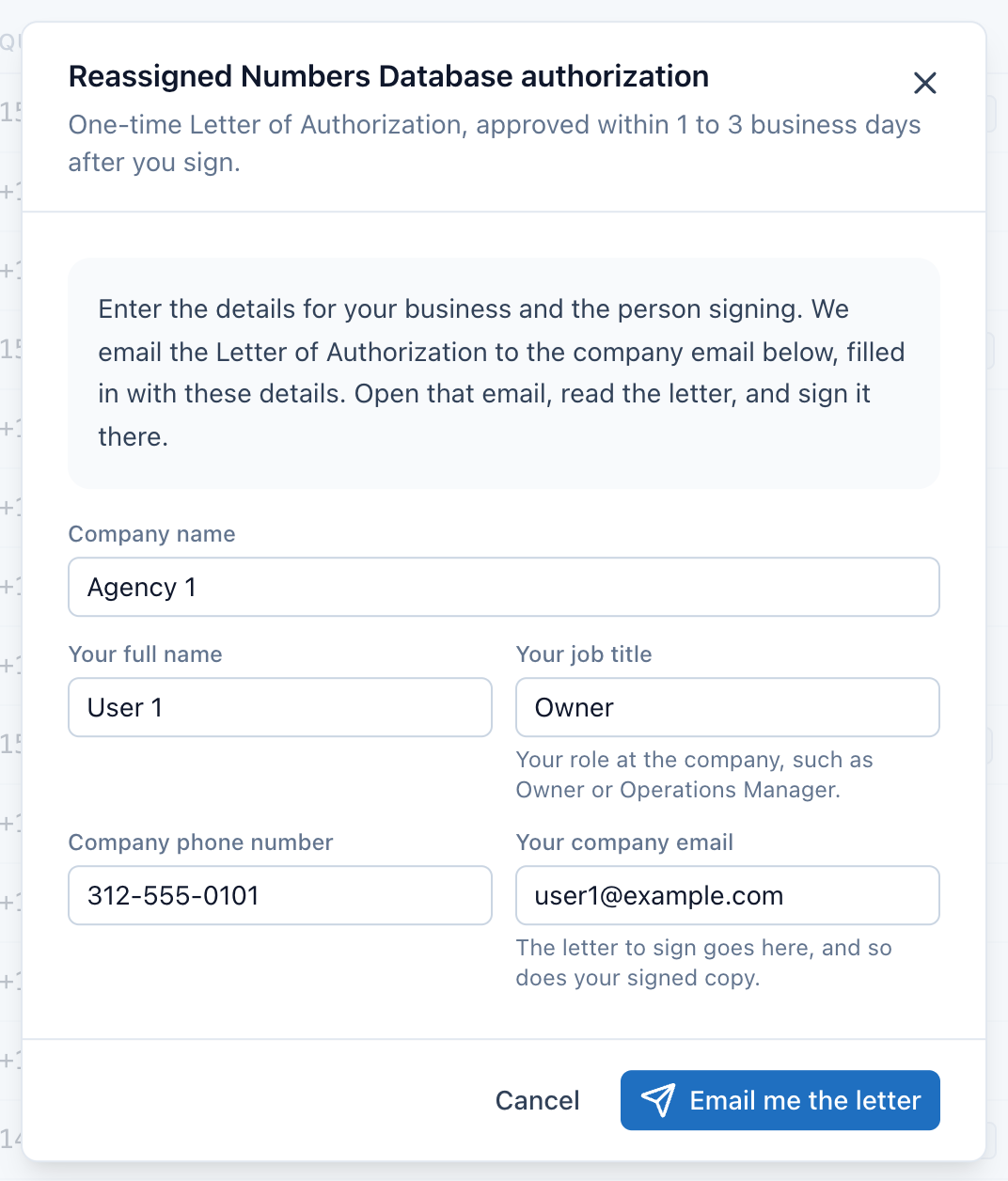
- Company name. Use the legal name of the business that makes the calls.
- Your first and last name, your job title, the company phone number and your company email, as the person signing for the business.
- Email me the letter sends it to your company email. It stays grayed out until every field is filled in.
Enter your job title in the title field, such as Owner or Operations Manager. If the title field holds your name, the form shows an error and asks for your job title, because the FCC database records the signer by name and title.
The company phone number is a 10 digit US number. Your company email starts as the address you sign in with. Change it if that is a personal address, since the letter needs the email you use for the business, and that is where the letter goes.
Select Email me the letter. The notice on the Phone scrub tab changes to "Check your email to sign the letter".
Step 3. Sign the letter in the email
DialClear sends the Letter of Authorization to your company email. The email comes from DialClear at no-reply@dialclear.co, with the subject "Sign your DialClear Letter of Authorization". Check your spam folder if it is not there within a few minutes. Select Open and sign the letter, read the letter, and sign it. When you finish, you get your own signed copy by email, with a certificate that records when and where it was signed.
By signing, you confirm you are authorized to act for your business, and your business appoints DialClear LLC as its agent to check numbers in the database. DialClear adds your business as a client company there, gives the database your contact details, and runs each check under your business's own database ID. Your business agrees to use the database and its results only to see whether a number was disconnected since the date you give, for lawful calls and texts. Each date you give is one you reasonably and in good faith believe the person could still be reached at that number. Your business stays the caller for every call and text, and any safe harbor comes from the FCC's rules, with the burden of proving it on your business.
If the email never arrives, select Send it again on the Phone scrub tab. You can ask for a new copy after a few minutes.
Step 4. Wait for approval
Approval takes 1 to 3 business days after you sign. DialClear registers your business with the Reassigned Numbers Database and sends your signed letter to the team that runs it. Once they approve it, your business gets its own ID in the database, and DialClear runs every check for you under that ID, which is what shows your business checked. The notice on the Phone scrub tab changes to match.
| What you see | What it means | What to do |
|---|---|---|
| Premium requires a one time authorization | No letter yet | Select Authorize and fill in your details |
| Check your email to sign the letter | The letter was emailed and is not signed yet | Open the email and sign. Select Send it again if it never arrived |
| Pending approval (1-3 business days) | You signed, and the letter is in review | Nothing. Premium unlocks when it is approved |
| The authorization letter was updated | The letter changed after you signed, and the one you signed no longer applies. Premium checks pause until the new one is approved | Select Review and sign and sign the current letter |
| Authorization was not approved | Your letter was declined, with the reason underneath | Fix what the reason says and select Resubmit authorization |
| Your letter is approved, setup in progress | Approved, and DialClear is finishing your setup with the database | Nothing. Premium checks start once setup is done |
| The notice is gone | Your letter is approved and set up | Turn on the premium check in Settings |
The letter itself is free.
Turn on the premium check
Step 1. Check the premium box
Open Settings. In the Phone screening row, check Premium: reassigned-number check ($0.15/lookup). The change saves on its own. The box can only be changed while the phone screening switch is on and your letter is approved.
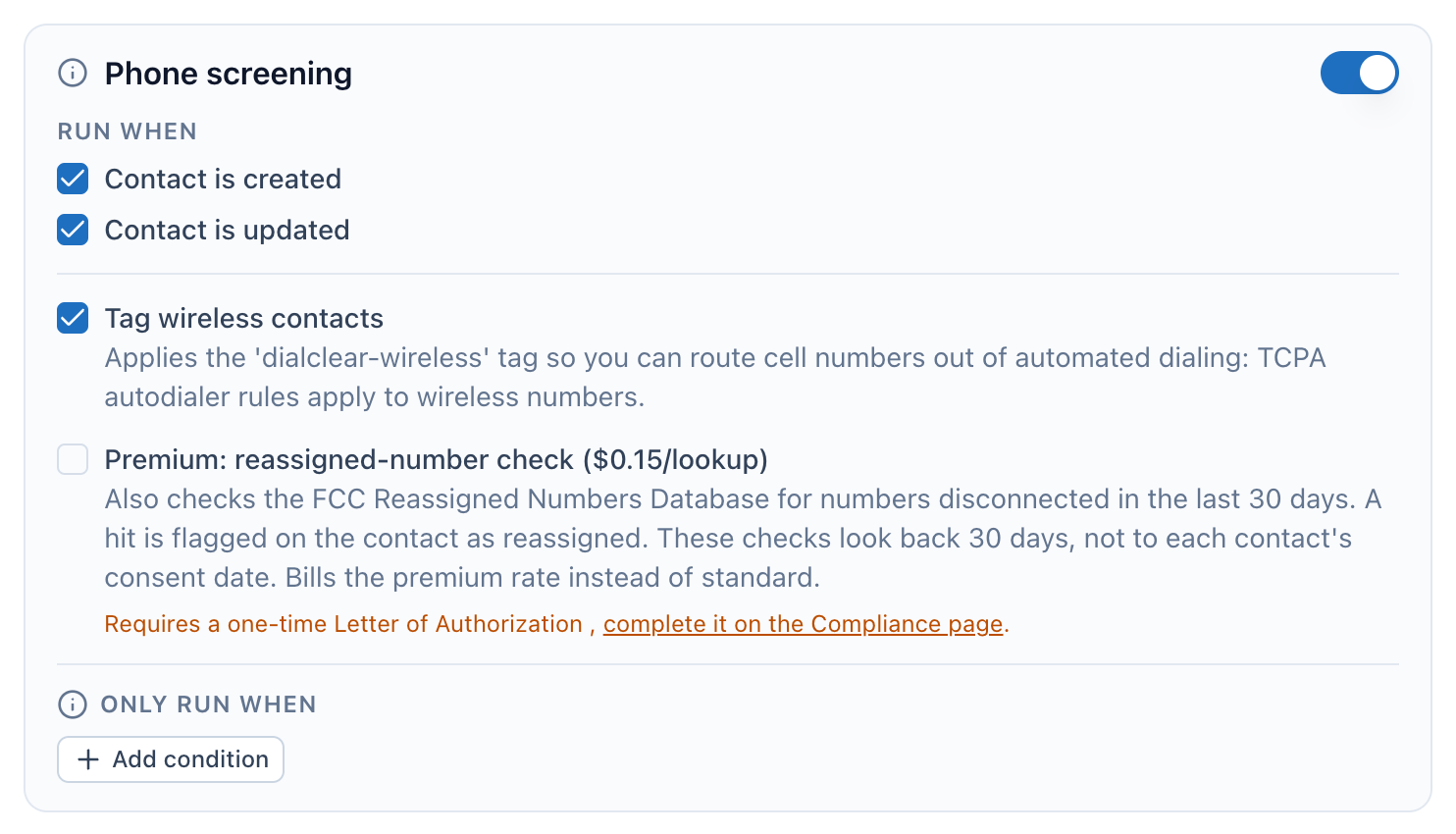
- The phone screening switch. The premium box can only be changed while it is on.
- The premium reassigned number check, $0.15 per phone screen.
- Until your letter is approved, this note shows and the box stays grayed out.
What happens to contacts
- Phone screens that run on their own, automatic screens on contact events and 30 day Protection on CRM contacts, also ask the database whether the number was disconnected in the last 30 days. Their result says it is not consent dated.
- A screen you start yourself runs the check only with the date of consent or last contact you give, because a safe harbor needs a consent dated check. That covers a single lookup on Lookups, Re-scrub now in your history and requests from your server with
consentDate. Without a date it runs the standard screen at the standard price and says the check did not run. - A trigger tag cannot carry a date, so a tag runs the standard phone screen without the check.
- When the answer is yes, the result is flagged with
reassigned-number. You see it in Lookups and in theDialClear | Blacklist Reasonfield on the contact. - If a lookup fails, the charge is reversed and you pay nothing for it.
Note
A reassigned result is flagged on the contact and in its DialClear fields, but it is not one of the Automatic DND flag categories. On its own it does not mark the contact Do Not Disturb. Use the DialClear | Blacklist Reason field in a smart list or a workflow to act on it.
Frequently asked questions
How long does approval take?
1 to 3 business days from when you sign. You do not need to do anything while you wait. If something on the letter needs fixing, the notice on the Phone scrub tab says what, and you can resubmit.
Why am I asked to sign again?
When the Letter of Authorization changes, a letter signed on the earlier wording no longer applies, because you never agreed to the new text. The notice on the Phone scrub tab says "The authorization letter was updated", and you get an email too. Select Review and sign, read the current letter and sign it. Premium checks resume once it is approved, which takes 1 to 3 business days.
Can I pick the consent date the check looks back to?
Phone screens that run on their own in your CRM account always look back 30 days, and the result says so. Every check you start yourself needs the date of consent or last contact, and there is no default. That is a single lookup on the Phone scrub tab of Lookups, Re-scrub now in your history, and an API request, with consentDate on an account key or with premium=1 and consentDate on a personal key. Enter the date this person gave consent, or the last date you know you reached them at that number.
Does a clean answer protect me from a lawsuit?
DialClear reports what the database answers. It does not give legal advice and cannot promise any legal outcome. Ask your own legal counsel how the FCC rules apply to your calling.
My letter is approved but the box is still gray
Make sure the phone screening switch is on, then reload Settings. The box is grayed out whenever phone screening is off. If the note under the box says your letter is approved and setup is in progress, DialClear is still finishing your setup with the database, and the box unlocks once that is done.
Do I sign again for every account?
Yes. A letter belongs to one account, because it is signed for the business behind that account. Each account you run signs its own.