
Looking up addresses and time zones
Turn on address and location lookup so each contact gets a cleaned up address and its real local time zone.
3 min read
Before you start
- Permission to change settings in this account
- Contacts with at least a state or a zip code
Tip
A state or a zip code is enough. DialClear fills in the rest at the finest level it can find.
Calling hours rules follow the time where the person is, not the time where your office is. Address and location lookup works out each contact's actual time zone from whatever address it has, and writes a cleaned up address back to the contact. It costs $0.08 per lookup at the current list price, charged to your CRM wallet.
Turn it on
Address and location lookup has its own row in Automatic scrubbing on Settings, called Address & location lookup. Turning on automatic scrubbing covers the switch and the triggers step by step.
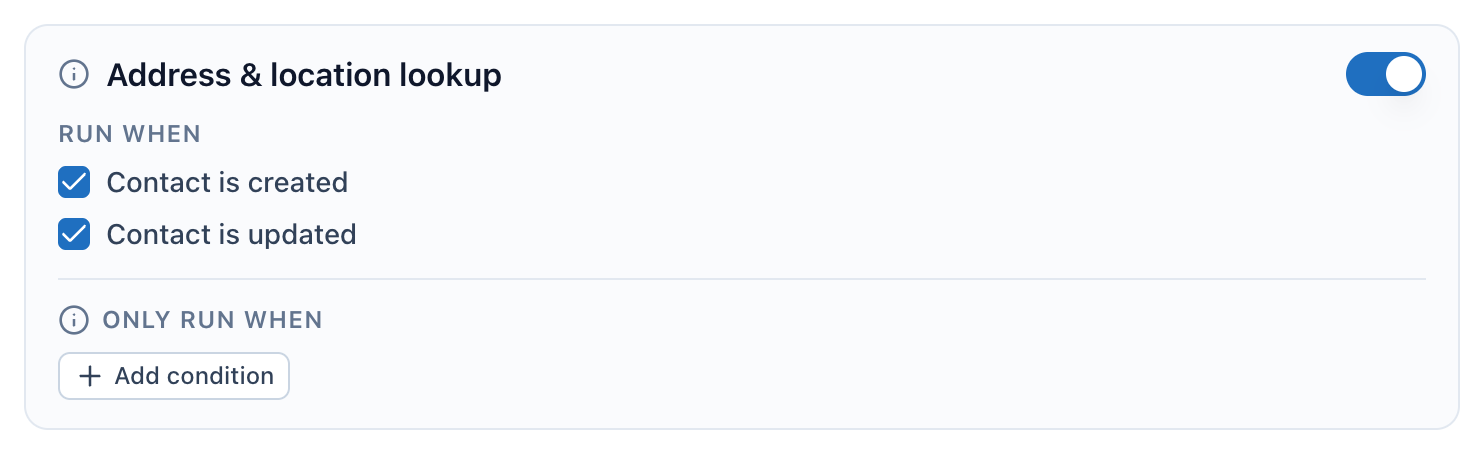
- The switch. On means a lookup runs automatically for contacts that have an address.
- Run when. Contact is created looks up new contacts, Contact is updated looks up a contact again when its address changes.
- Only run when. Add a condition here to limit which contacts get a lookup.
What it needs
A contact needs at least a state or a zip code. A street address, a city, or both make the result more precise. A contact with neither a state nor a zip code is skipped and not charged.
Contact is updated only runs a new lookup when the street address, city, state or zip code changes. Editing anything else, including the time zone, does not run a lookup.
What happens to contacts
The lookup updates the contact's own address fields with the cleaned up version. That covers street address, city, state, postal code, country and time zone. It uses the short form, such as CA rather than California.
It also fills in the DialClear location fields, such as DialClear | County, DialClear | Latitude, DialClear | Longitude, DialClear | Timezone ID and DialClear | Timezone Abbreviation. There are 30 location fields in all, each with a short and a long version where that makes sense. A field DialClear has no value for is left as it was.
Note
DialClear writes back the address it found. If a contact had a typo in the street name, the corrected spelling replaces it.
Frequently asked questions
Why did the lookup change my contact's address?
Address and location lookup writes the standardized address back to the contact. If you would rather keep addresses exactly as typed, turn this service off.
Does it look up an address outside the United States?
When the contact has a country, DialClear sends it along with the address, so a zip code is read in the right country. Use a full address for the best result outside the United States.
Where do I see the result?
On the contact, in the DialClear location fields, and in Lookups under Geolocation.