
Turning on automatic DND
Have DialClear mark flagged contacts Do Not Disturb in your CRM, on the channels and for the list types you choose.
5 min read
Before you start
- Phone screens running in this account, automatic or started another way
- Permission to change settings in this account
Tip
Call and SMS are on from the start. Add the other channels only if you also want flagged contacts blocked there.
When a phone screen finds a contact's number on a list you care about, DialClear can mark that contact Do Not Disturb in your CRM. Your CRM then stops calls, texts or other messages to the contact on the channels you picked. Automatic DND has no extra cost. It acts on phone screens you already pay for.
How it decides
Two things must be true before DialClear marks a contact.
- The number is flagged in a category that is switched on for that kind of screen. Automatic screens use Flag categories for automatic scrubs. Screens a person starts use Flag categories for manual scrubs.
- At least one channel is switched on, or the master switch is on.
Out of the box, the Call and SMS channels are on. For automatic screens, every category is on except Federal DNC and State DNC. For screens a person starts, every category is on.
Why automatic screens skip the Do Not Call lists
Automatic screens run on new and updated contacts. Most new leads gave you consent to contact them, and a Do Not Call listing does not cancel that consent. So by default, a listing on the Federal or a state Do Not Call list does not block a new lead by itself. Litigator, attorney and other high risk flags still block it. You can switch Federal DNC and State DNC back on if your business needs it.
A screen a person starts is a deliberate check, so those lists flag by default. That covers Re-scrub now, a trigger tag such as dialclear or dc-phone, and a request from your server through an account key. Every change on this card saves on its own. The line at the bottom reads "Changes save automatically." and then "All changes saved."
Set it up
Step 1. Open the Automatic DND card
Open Settings and scroll to Automatic DND, under the Automatic scrubbing card. It is dimmed while automatic phone screening is switched off, but its settings still apply to phone screens started any other way.
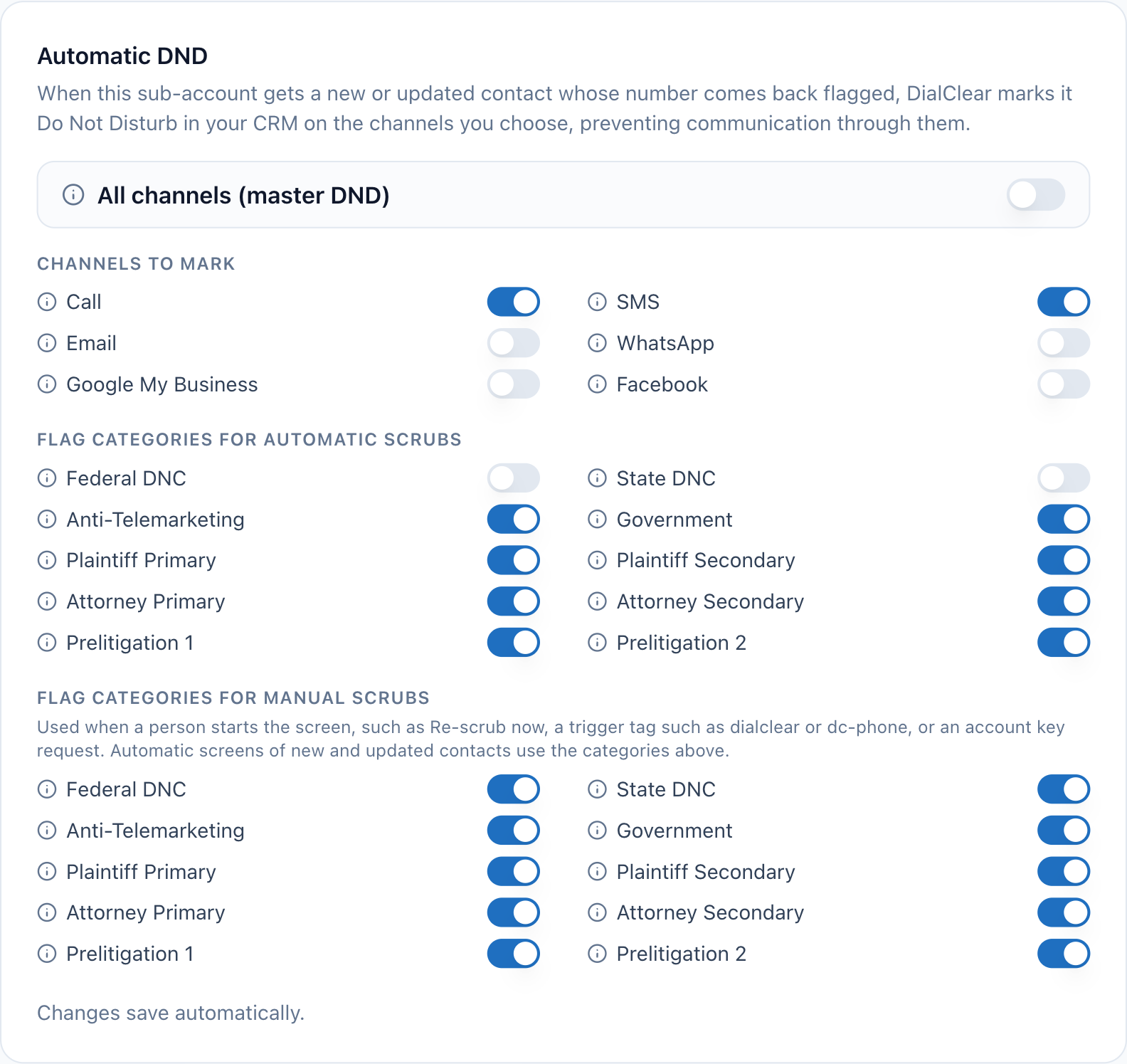
- The master switch. On blocks every channel for a flagged contact, whatever the channel switches say.
- Channels to mark. Each switch blocks one channel for a flagged contact.
- Flag categories for automatic scrubs. Only a flag in a category that is on marks the contact.
- Flag categories for manual scrubs. These apply when a person starts the screen.
Step 2. Pick the channels
Under Channels to mark, switch on each channel a flagged contact should be blocked on.
| Channel | What gets blocked |
|---|---|
| Call | Phone calls from your CRM |
| SMS | Text messages |
| WhatsApp messages | |
| Google My Business | Google Business Profile messages |
| Facebook messages |
If you switch every channel off, the card warns "No channels selected, flagged numbers will be recorded but not marked DND." Results still land on the contact and in Lookups, and nothing is blocked.
Step 3. Decide on the master switch
All channels (master DND) turns on the contact's master Do Not Disturb, which blocks all communication from your CRM on every channel. While it is on, the channel switches are grayed out.
Warning
Turning the master switch off leaves no channels selected. Switch the channels you want back on right after, or flagged contacts are recorded but not blocked.
Step 4. Pick the flag categories
There are two sets of switches with the same list types.
- Flag categories for automatic scrubs applies to automatic screens of new and updated contacts, and to 30 day Protection.
- Flag categories for manual scrubs applies to screens a person starts.
In each set, leave on each list type that should mark a contact, and switch off any you only want recorded. Both sets use the same channels.
| Category | Numbers it covers |
|---|---|
| Federal DNC | Numbers on the Federal Do Not Call list |
| State DNC | Numbers on any state Do Not Call list |
| Anti-Telemarketing | Members of anti telemarketing activist groups |
| Government | State and federal government office numbers |
| Plaintiff Primary | Numbers confirmed to have received the call or text that started a TCPA lawsuit |
| Plaintiff Secondary | Numbers likely tied to a TCPA plaintiff or their household |
| Attorney Primary | Numbers confirmed to belong to attorneys representing TCPA plaintiffs |
| Attorney Secondary | Numbers tied to other attorneys at firms that file TCPA suits |
| Prelitigation 1 | People who filed a TCPA suit or sent a written demand letter |
| Prelitigation 2 | People who verbally threatened a caller with a lawsuit |
What happens to contacts
- A flagged contact is marked DND on your chosen channels the moment its phone screen finishes.
- DialClear also adds a note to the contact listing each list the number matched.
- Every phone screen in this account applies these settings. Automatic screens and 30 day Protection use the automatic categories. Trigger tags, re-scrubs you start by hand and requests from your server through an account key use the manual categories.
- DialClear only ever turns DND on. It never takes DND off a contact, even when a later screen comes back clean.
Frequently asked questions
Will changing these settings update contacts I already screened?
No. Settings apply to phone screens that run after the change. To apply them to an older contact, screen it again, for example with a trigger tag.
Does a reassigned number get marked DND?
Not through these categories. The premium reassigned number check flags the number, but a reassigned result is not one of the flag categories. See Checking for reassigned numbers.
Is DND the same as removing someone from my lists?
No. DND stops your CRM from contacting the person on those channels. The contact stays in your CRM with its history.