
Verifying a contact owns their number
Turn on contact verification to score how likely each contact's name belongs to their phone number, and add the premium carrier identity match.
3 min read
Before you start
- Permission to change settings in this account
- Contacts with a phone number and a name
Tip
Start with the standard check. Add the premium match when a wrong number costs you more than $0.25.
Contact verification checks whether the name on a contact plausibly owns the phone number on it. It compares the name with caller ID data and looks at the line type and whether the line is active. The answer is a trust score from 0 to 100 with a band of high, medium or low.
Turn on contact verification
Contact verification has its own row in Automatic scrubbing on Settings, with a switch and Run when triggers. Turning on automatic scrubbing covers the switch and the triggers step by step.
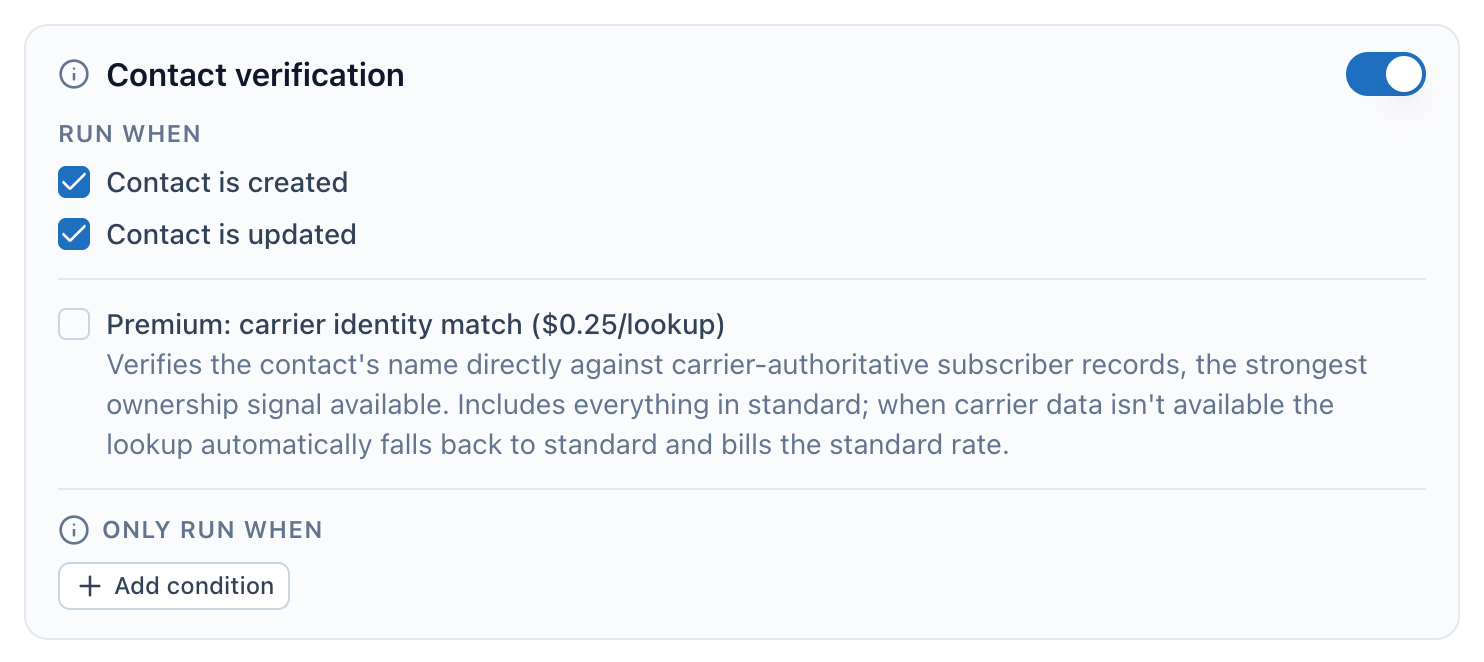
- The switch. On means each contact with a phone number and a name is verified automatically.
- Run when. Pick new contacts, updated contacts, or both.
- The premium carrier identity match, $0.25 per lookup instead of $0.08.
- Only run when. Add conditions to limit which contacts are verified.
A contact needs both a phone number and a name. A contact missing either one is skipped and not charged. Contact is updated only runs a new check when the phone number or the name changes.
Add the premium carrier identity match
The standard check costs $0.08 per lookup at the current list price. The premium check costs $0.25 instead, and checks the contact's name directly against the subscriber records the phone carrier holds. That is the strongest ownership signal DialClear offers. It includes everything in the standard check.
Step 1. Check the premium box
In the contact verification row, check Premium: carrier identity match ($0.25/lookup). It saves on its own. You can only change the box while the contact verification switch is on.
Once checked, the premium match applies to every contact verification in this account. That covers automatic checks, trigger tags, re-scrubs you start by hand and requests from your server through an account key.

- Premium carrier identity match. Checked means every verification in this account uses carrier records when they are available.
When the carrier has no record to compare, the lookup falls back to the standard check on its own. You are charged the standard $0.08 for that lookup, and the difference is returned.
What happens to contacts
The result is written to six fields on the contact. Each field name starts with DialClear |.
| Field | What it holds |
|---|---|
| Trust Score | A number from 0 to 100 |
| Trust Band | high (75 and up), medium (45 to 74) or low |
| Line Type | The kind of line, such as mobile |
| Carrier | The phone carrier |
| Line Status | active, reachable, unreachable, inactive or unknown |
| Last Verified | When the check ran |
The full result, with the reasons behind the score, is in Lookups. For more on reading the fields, see See a contact's verification result in your CRM.
Frequently asked questions
Why is the score low when the name looks right?
Caller ID names are often short or out of date, and some carriers do not share one. A business line or an inactive line also lowers the score. The reasons in Lookups show what pulled it down.
Does a high score mean I have consent to call?
No. The score says how likely the name owns the number. Consent is a separate question that DialClear does not answer.
Can I verify a contact that has no name?
No. Verification compares a name with the number, so a contact needs both. Phone screening still runs on a contact with only a number.