
What DialClear does and the two ways to use it
A quick tour of what DialClear checks, what it keeps for you, and how to choose between the CRM app and the portal at dialclear.co.
4 min read
Tip
If your contacts already live in LeadConnector, start with the CRM app. Screening runs on its own there.
DialClear checks phone numbers before you call or text them. It tells you when a number is on a Do Not Call list, belongs to a known litigator, or looks risky, so you can decide what to do before you dial.
What DialClear checks
There are three kinds of lookup, and two of them have a premium version. You pay for each lookup that runs and nothing else.
| Lookup | What it tells you | Price |
|---|---|---|
| Phone screening | Federal and state Do Not Call lists, litigator lists, and whether the number looks valid | $0.07 |
| Phone screening premium | Everything above, plus a check of the FCC Reassigned Numbers Database | $0.15 |
| Address and location lookup | A cleaned up address, map location and time zone | $0.08 |
| Contact verification | How well the name on the contact matches the number | $0.08 |
| Contact verification premium | Adds a carrier identity match | $0.25 |
Every result is saved to your lookup history so you can search it later. Reading a lookup result explains what each result means.
Note
These are today's prices. A CRM install keeps the per lookup prices from the day it was installed.
What else comes with it
30 day protection screens your contacts again on a rolling 30 day cycle, because a clean number today can land on a list next month. You pay only for the lookups it runs. See Keeping your numbers screened every 30 days.
With Shield, a number flagged elsewhere on the DialClear network gets the same flag on your matching contacts in your CRM.
The DNC Audit Pack gives you a written Do Not Call policy, monthly compliance reports and the Consent Vault. The Vault proves a consent record has not been changed since it was saved. It does not prove the consent itself was valid.
Shield and the DNC Audit Pack are paid add ons. Which features are in my plan covers what each plan includes.
The two ways to use DialClear
Inside your CRM
Install DialClear from the LeadConnector App Marketplace and it shows up in the left menu of your sub account. New and updated contacts are screened on their own, results are written back to the contact, and lookups bill your CRM wallet. There is no separate sign in. See Install DialClear from the App Marketplace.
The portal at dialclear.co
Sign up at dialclear.co if you do not use LeadConnector, or if you want to connect your own software through the API. You can look up numbers one at a time or upload a CSV file here, and you can do both inside your CRM too. Lookups spend tokens from a prepaid balance that you buy with a card. See Create a DialClear account.
Both ways open the same app with the same menu. A Help item for these articles sits in the Account group.
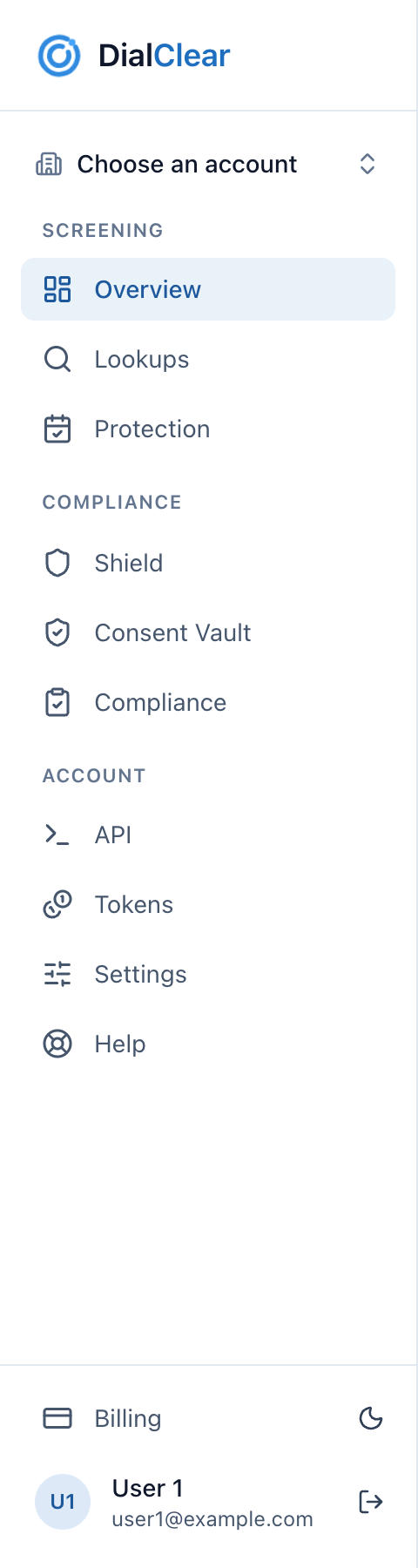
- Screening holds your Overview, your lookups and 30 day protection. This is where most of the daily work happens.
- Compliance holds Shield, the Consent Vault and Compliance reports. Inside your CRM these only appear when your plan includes them.
- Account holds API, Tokens, Settings and Help. API and Tokens only appear in the portal, never inside your CRM.
- Billing shows how you pay and, for portal accounts, your subscriptions and cards.
The differences between the CRM app and the portal article covers what changes between the two.
Frequently asked questions
Does DialClear make me compliant?
No tool can promise that. DialClear gives you screening data, automatic screening again over time and a tamper evident record of consent you collect. How you contact your leads, and following the TCPA and Do Not Call rules, stays your responsibility. DialClear is not a law firm and does not give legal advice.
Can I use both the CRM app and the portal?
Yes. If your email is the same in both, it is one person in DialClear. Inside your CRM, lookups always bill that account's CRM wallet. In the portal, if you can bill more than one place, the Lookups page asks which one pays before it runs.
Is there a monthly fee?
Not for screening. You pay per lookup. Shield and the DNC Audit Pack are optional monthly add ons.